



Okay you believe what you think..... And you are right about the apples to apples thing that is why you are wrong  Let me tell you this now though, whatever you believe now doesn't really matter. As there is an electronics company in Britain developing something different that won't even run on a pixel related basis and I know that this technology is already in use. Just hasn't hit main stream yet due to the costs.
Notifications
Clear all
Small Talk
41
Posts
12
Users
0
Reactions
6,209
Views


i know a technology that didn't use pixels as well, it's called the SDTV. And it's the reason why the 1080/720/480 numbers measure horizontal lines on the screen.

Originally posted by MrMardyBum
Originally posted by elhh82
no 1080p means 1080 horizontal lines for the image, 720p means 720 lines.http://en.wikipedia.org/wiki/High-definition_television
i think you've confused it with the printer specs which goes by dpi (dots per inch)
No offence my friend but you are very wrong on a standard HDTV at 1080p there is 2,07 million pixels.
You are thinking of 1080i
P.S I know I am right. The price you would pay for a 21" monitor that could beat a 1080p HD TV would buy you a 60" LCD HDTV.... Wikipedia isn't the best reference pointOk, 1st as elhh82 mentioned, 1080p has a resolution of 1920x1080. 2nd 1080i ALSO has a resolution of 1920x1080 surprise surprise... The p and i stand for progessive and interlaced, it is just the way the screen refreshes between frames. How about before you bag wikipedia as a reference point you have at least some idea what YOU are talking about first.
Originally posted by elhh82
i know a technology that didn't use pixels as well, it's called the SDTV. And it's the reason why the 1080/720/480 numbers measure horizontal lines on the screen.
Or perhaps film? I heard about this new film technology that might come out soon...
Lol.. I just hope we are all here when the new one comes out for public consumers. For now I'll just say okay whatever.
Originally posted by GunFlavoured
Originally posted by MrMardyBum
Originally posted by elhh82
no 1080p means 1080 horizontal lines for the image, 720p means 720 lines.http://en.wikipedia.org/wiki/High-definition_television
i think you've confused it with the printer specs which goes by dpi (dots per inch)
No offence my friend but you are very wrong on a standard HDTV at 1080p there is 2,07 million pixels.
You are thinking of 1080i
P.S I know I am right. The price you would pay for a 21" monitor that could beat a 1080p HD TV would buy you a 60" LCD HDTV.... Wikipedia isn't the best reference pointOk, 1st as elhh82 mentioned, 1080p has a resolution of 1920x1080. 2nd 1080i ALSO has a resolution of 1920x1080 surprise surprise... The p and i stand for progessive and interlaced, it is just the way the screen refreshes between frames. How about before you bag wikipedia as a reference point you have at least some idea what YOU are talking about first.
So if i put my TV on its side will it be 1920p?
:f_wink:
Originally posted by shane0878
So if i put my TV on its side will it be 1920p?
No, you'd have to put your blu ray player on its side as well, so the disc loads the 1920p material 
Im running of a 23inch monitor with a 1920 x 1080 resolution.
This tiles 16 tables nicley with no overlapping.
My question is are there bigger resolutions than this? And whats the min size your monitor will need to be?
I want to move up and start playing like 21/24 tables at a time....Maybe more. Either i'll get another 23inch or proferabley another monitor with a bigger resolution. I like having one screen for poker and one for browsing. Keeping all tables on one screen reduces cusor movment. This is why im after a monitor with bigger resolution.
alternatively dell's new 27" does 2560x1440
almost all 30" models should do 2560x1600. But you can't drive it with just a vga connection. You'd need at least a dual-link dvi to drive it at full resolution.

Originally posted by PocketAcesJohn
I want to move up and start playing like 21/24 tables at a time....Maybe more. Either i'll get another 23inch or proferabley another monitor with a bigger resolution. I like having one screen for poker and one for browsing. Keeping all tables on one screen reduces cusor movment. This is why im after a monitor with bigger resolution.
21/24 tables and another screen for browsing ♠_o:
I'm going cross eyed just thinking about it.
Originally posted by elhh82
alternatively dell's new 27" does 2560x1440almost all 30" models should do 2560x1600. But you can't drive it with just a vga connection. You'd need at least a dual-link dvi to drive it at full resolution.
Well atm i'm just running my 23" of my laptop. Soi i have my LT screen and my 23". I'm not so could with this technically jargin so what is a "dual-link dvi"? I asume i couldnt just run a 30" of my laptop how it is like i am with my 23"?
Originally posted by shane0878
Originally posted by PocketAcesJohn
I want to move up and start playing like 21/24 tables at a time....Maybe more. Either i'll get another 23inch or proferabley another monitor with a bigger resolution. I like having one screen for poker and one for browsing. Keeping all tables on one screen reduces cusor movment. This is why im after a monitor with bigger resolution.21/24 tables and another screen for browsing ♠_o:
I'm going cross eyed just thinking about it.
You get used to the additional tables pritty quickly tbh. As i said im only 16 tabling atm though. Im sure 24 tables would be alittle fast at first, but no dough will quickly get used to it and there will be no rushes 
Lol @ the 1080i/p discussion. Thought this was common knowledge...
Anyway i'm kinda interested in what technology/firm/lab you're refering to?
Or is it a secret?
BTW, anyone heard about that new Flyfire technology? Images created by light emitting micro helicopters? Now that's sick!
Originally posted by PocketAcesJohn
Originally posted by elhh82
alternatively dell's new 27" does 2560x1440almost all 30" models should do 2560x1600. But you can't drive it with just a vga connection. You'd need at least a dual-link dvi to drive it at full resolution.
Well atm i'm just running my 23" of my laptop. Soi i have my LT screen and my 23". I'm not so could with this technically jargin so what is a "dual-link dvi"? I asume i couldnt just run a 30" of my laptop how it is like i am with my 23"?
i think your 23" pretty much maxes out what your laptop can handle on the standard vga connection (1920x1280 via the blue output).
you will need to use the DVI output (white socket) to feed higher resolutions. And you need to make sure its capable of running dual-link, and that you have a dual link cable. (Basically what dual-link is, is a full speed DVI connection, they also come in half-speed mode in the cheaper setups, these are the single-link DVI)
Originally posted by elhh82
Originally posted by PocketAcesJohn
Originally posted by elhh82
alternatively dell's new 27" does 2560x1440almost all 30" models should do 2560x1600. But you can't drive it with just a vga connection. You'd need at least a dual-link dvi to drive it at full resolution.
Well atm i'm just running my 23" of my laptop. Soi i have my LT screen and my 23". I'm not so could with this technically jargin so what is a "dual-link dvi"? I asume i couldnt just run a 30" of my laptop how it is like i am with my 23"?
i think your 23" pretty much maxes out what your laptop can handle on the standard vga connection (1920x1280 via the blue output).
you will need to use the DVI output (white socket) to feed higher resolutions. And you need to make sure its capable of running dual-link, and that you have a dual link cable. (Basically what dual-link is, is a full speed DVI connection, they also come in half-speed mode in the cheaper setups, these are the single-link DVI)
Oh awesome. Well i have the white cable, it came with the screen. So Would i conect this ASWELL as the blue cable? Or just replace the blue one with the white one? Also how do i check if my laptop is capable of working with the white cable?
Many thanks in advance.

Clearly the only answer is 24" x 3 at 1920x1200. Just make sure you get a video card that can do triple DVI out.
Originally posted by iamblueandurmine
In the words of my ex girlfriend... the bigger the better.. sigh
Sounds like you made the right choice there. ♦
PocketAcesJohn:
You need to see if your laptop has a white connection plug that fits the white cable. You will only need this.
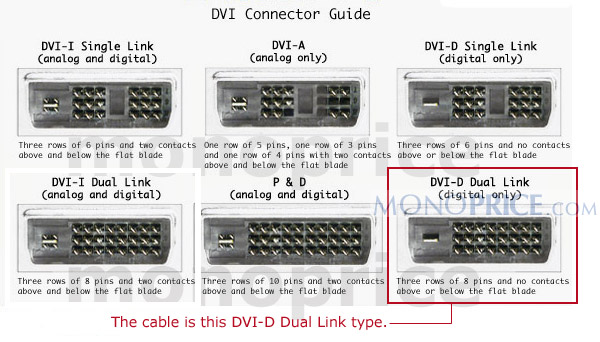
Also your cable needs to have a pint configuration like the one on the bottom right for it to be dual link. If its like the one on top right its a single link.
If your laptop does not have the white DVI plug, check if it has the HDMI output, that will work as well.
And finally, you only need to plug in the white cable, not both the white and the VGA.

Originally posted by elhh82
PocketAcesJohn:You need to see if your laptop has a white connection plug that fits the white cable. You will only need this.
Also your cable needs to have a pint configuration like the one on the bottom right for it to be dual link. If its like the one on top right its a single link.
If your laptop does not have the white DVI plug, check if it has the HDMI output, that will work as well.
And finally, you only need to plug in the white cable, not both the white and the VGA.
Tahnks for this usefull for me cos my new monitor ain't going to have DVI cable with it, only VGA cable! So i have to get DVI cable ,myself! But whats the difference? quality?
Too bad that 8800GTS don't have HDMI support.