Skip to forum
Notifications
Clear all

[Guide] Universal Replayer - Session Review in our live coaching

8 Posts
3 Users
0 Reactions
7,912 Views
Head Admin
SvenBe
Joined: 19.04.2006

Hi, session reviews are often beneficial for improving your poker skill. You can take your time to analyze hands. On occasion coaches do session reviews not only for videos, but also for our live coaching sessions.

To make session reviews accessible for you, we have prepared a little guide to using the Universal Replayer.

Attention: This software is not an offer of PokerStrategy.com and use is at your risk

If you got a TXT-hand history file follow these instructions to go further::

easy way to open TXT- hand history files

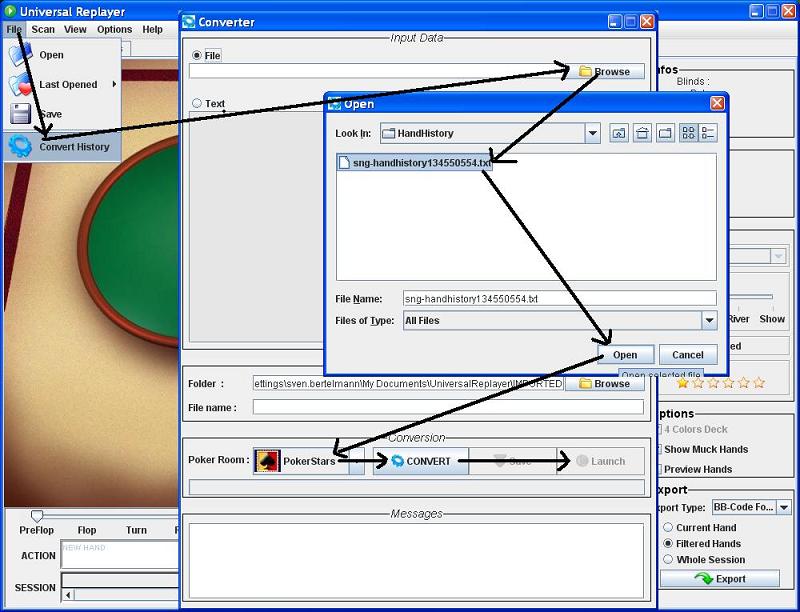
another way to open TXT-hand history files

You already got a converted XML-file for the replayer?:

opening a XML hand history-file in Universal Replayer öffnen


Reply
Quote
7 replies
Head Admin
SvenBe
Joined: 19.04.2006

  • 3. for TXT-hand history files: After starting the Universal replayer simply open Explorer
  • 4. Choose the hand history file and drag it on to the Universal Replayer
  • 5. Choose Poker-Room and press OK
  • 6. If everything worked out perfectly you should already be able to see the hand history in the Universal Replayer - the Session Review Coaching is about to begin!

Reply
Quote
Head Admin
SvenBe
Joined: 19.04.2006

  • 3. There is also a 2nd way to read text hand history files: After starting the program first choose file->convert history.
  • 4. Choose the file from the directory where it is stored
  • 5. Choose Poker-Room and click on convert
  • 6. Should everything work out, the Launch button will become click-able and the session review can start!

Reply
Quote
Head Admin
SvenBe
Joined: 19.04.2006

  • 3. Have you already got a converted XML-file for your session review? Simply choose File->open
  • 4. Choose the hand history and click on open
  • 5. The hand history should now be visible and the coaching review can begin!

Reply
Quote
FinalTableTillus
Joined: 16.10.2006

is it possible to save the replay as a video file with the software and if how?


Reply
Quote
Head Admin
SvenBe
Joined: 19.04.2006

nope, we use Camtasia 6 or 7 for this purpose. In addition you can record the voice of coaches that are commenting on the play.
It will look like that one: http://de.pokerstrategy.com/video/15924/


Reply
Quote
pabo69
Joined: 18.03.2008

"[120611 13:37:15] Unable to understand line : PokerStars Game #63219756320: Tournament #424010396, $20+$2 USD
[120611 13:37:15] Unable to understand line : Hold'em No Limit - Level II (15/30) - 2011/06/11 18:15:30 CET
[120611 13:37:15] Unable to understand line : [2011/06/11 12:15:30 ET]
[120611 13:37:15] Unable to understand line : Tens and Fours
[120611 13:37:15] Unable to understand line : PokerStars Game #63219790032: Tournament #424010396, $20+$2 USD
[120611 13:37:15] Unable to understand line : Hold'em No Limit - Level II (15/30) - 2011/06/11 18:16:25 CET
[120611 13:37:15] Unable to understand line : [2011/06/11 12:16:25 ET]
[120611 13:37:15] Unable to understand line : PokerStars Game #63219805129: Tournament #424010396, $20+$2 USD
[120611 13:37:15] Unable to understand line : Hold'em No Limit - Level II (15/30) - 2011/06/11 18:16:49 CET
[120611 13:37:15] Unable to understand line : [2011/06/11 12:16:49 ET]
[120611 13:37:15] Unable to understand line : Eights
[120611 13:37:15] Unable to understand line : PokerStars Game #63219829471: Tournament #424010396, $20+$2 USD
[120611 13:37:15] Unable to understand line : Hold'em No Limit - Level II (15/30) - 2011/06/11 18:17:29 CET
[120611 13:37:15] Unable to understand line : [2011/06/11 12:17:29 ET]"

can you help me?


Reply
Quote
Head Admin
SvenBe
Joined: 19.04.2006

unfortunately not from the spot. But here some things to check:

- hand history in english ?
- directly from PokerStars-Software and not just from Holdem Manager?
- does it work for cash game hand histories (just sit down at a NL2 table and play 1 hand to test)


Reply
Quote