Important note:
PokerStrategy.com is not liable for this piece of software and is/was not bound to its development in any form. PokerStrategy.com cannot guarantee freedom from error or reliability of this software. Usage is at own risk.
-----------------------------------------
Easy and quick changing of the looks of PartyPoker - background images, cards and much more.
I am proud to present you the SkinChanger: free and open source!
I always look forward to your feedback!
Current version: 2.05
The SkinChanger helps you to "skin" the PartyPoker software. It copies the necessary files to the right directories. You can flexibly arrange your skin seeing a preview before it is installed.
Screenshot of the program:
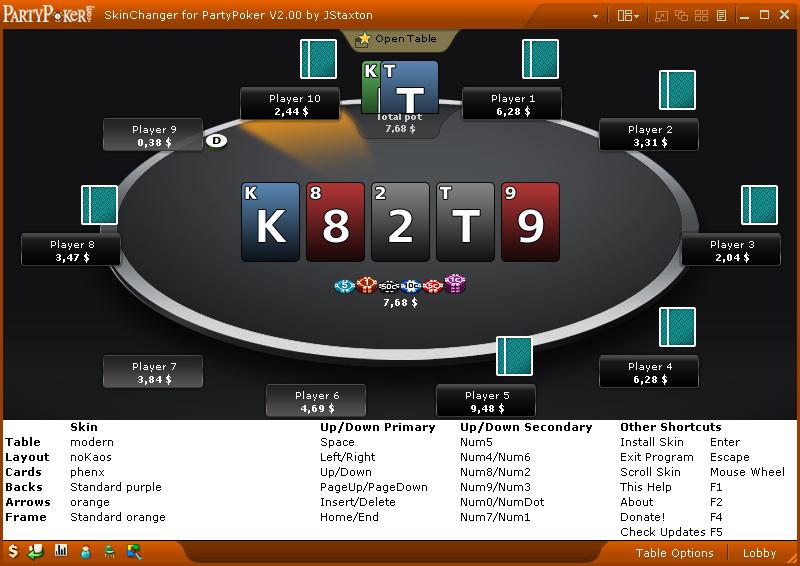
What the program does for you:
- Compatible to english and german PartyPoker client
- Organizing complete skins
- Changing of skins (layout, cards, ...) with shortcuts or scrollwheel possible
- Automatically creates a backup of all PartyPoker client images
- Looking for updates & downloading them automatically
- Looking for skins & downloading them automatically
- Complete preview of the selected skins
- Layout, cards, arrows, frames & cardbacks can be individually arranged
- Full portability; program dir is specified by the user
- Donate function, to help the project
Content of the program:
- [1] SkinChanger program (.exe)
- [39]classic layouts
- [13]modern layouts
- [5]classic arrows
- [8]modern arrows
- [12]frames
- [13]classic cardbacks
- [14]modern cardbacks
Download:
--> SkinChanger.exe (Version 2.05) (ca. 380KB)
Installing:
- Download the SkinChanger programs (see section Download)
- Start SkinChanger.exe
- If you already have a Skin folder then click "Yes", browse to that directory and select it; otherwise click "No"!
- Look for new skins via "right click" -> "Check for Updates" or use the shortcut "F5"
Setting up the PartyPoker client: (example for english client):
- Table Options->General Options: "Enable 4-color deck"
- Table Options->General Options: Uncheck "Display charakter/player image on table"
- Player Image->Classic Table Characters: "Classic characters"
- Themes->Card Decks: "Default"
- Themes->Table Themes->New Table: "Default"
- Themes->Table Themes->Classic Table: "Default"
- Themes->Switch Table: "PartyPoker classic"/"New PartyPoker"
New skins & own skins:
Just link to your new skins in here and I'll add them to the map pack if there are 3 or more people voting for it. Alternatively you can put the skins in the skin folder(s) on your own.
In case you want to create your own skin you can follow these steps:
- Copy all images of the PartyPoker client that you want to modify into a seperate folder
- Now modify the images as you like
a) if it is a classic layout, name the table "carpet.jpg" and copy the "table.png" from another skin (its just 1pix transparent png)
b) if it is a modern layout, name the table "Table_Carpet.jpg" heißt - Move this directory into the Skin folder (with respect to the skin folder structure)
- Restart the SkinChanger and install your new skin
Version numbers:
X.YZ
X - Program architecture changed (+features or bugfixes)
Y - new Features added (+bugfixes)
Z - bugfixes
Source code:
--> (.au3-Script) Source code of Version 2.05
--> (.au3-Script) Source code of the Zip-UDF Thanks to Torels UDF
--> (.au3-Script) Source code of Funcs
--> (.scm-Script) Source code of the Gimp-Script to convert old card sets
Disclaimer:
I did what I could to prevent major program bugs, but I cannot guarranty freedom from error. Use it at your own risk. What I can guarranty is that I wrote the code by myself (except AutiIt-Scripts and included scripts) and that I am hosting all files on my webspace.
Contact regarding SkinChanger:
email: jonathan.staxton@gmail.com
ICQ: 138 674 268
MSN: jonathan mnemonic
Skype: Jonathan Staxton
Have fun with the SkinChanger for PartyPoker!
Just post a comment if you dis-/like it!
JStaxton

 grate software - love the new skins ^^