



Hi guys,
we've had many questions from players that had problems depositing with or to the standard payment systems. This could either be because of regulatory restrictions, long waiting times or simply because fees are too high.
This is why we want to show you how to deposit with Cryptocurrencies, which can depending on your location cost as little as 20cent for any deposit.
Question: But does the crypto currency price not fluctuate too much? Won't I loose money if the exchange rate drops?
Our recommendation is to simply not hold the cryptocrurrency for any more time that is necessary between exchanging FIAT (i.e. $, € or £) for Crypto and sending it to the poker room. Due to this small period of time, market movements should be very limited - even though we can't guarantee that there are no movements at all.
Question: Doesn't that cost too much in random fees, is it not too complicated?
It is not true that using Cryptos has to be complicated. When pointed to the right place, it is not more effort than setting up a payment processor like Neteller or Ecopayz. If done correctly, fees can be close to 0 - depending on location and deposit options for your Fiat-Currency.
I've got no idea, so... how do I deposit with Crypto?
- 1. If you have never owned a crypto currency, you will need an account on a crypto exchange. We do recommend to register at Binance due to the variety of deposit options & low fees.
- 2. Finish the Verification step 1. How this is done can be found here: Guide
- 3. Go to Wallet->Deposit->Deposit Cash
- Euro deposits via SEPA are for free, there are other methods with small fees
- GBP deposits can be for free with bank transfers or for a small fee with credit card
- USD deposits can only be done via Bank Transfer, but good news - for free!
- Fees for other currencies like Brazilian Real, Russian Rubles, etc are varying and change from time to time. Please check when you select your currency.
- 4. After your deposit has cleared, go to ->Markets->FIAT Markets-> and type "LTC" in the search field. We do recommend to use Litecoins (LTC) for depositing because they cost very little fees to transfer & are faster than the commonly mentioned Bitcoin.
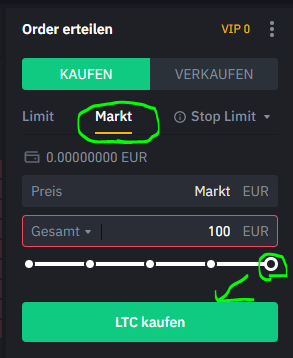
- 5. Then go to "Trade" for your LTC-Currency combination and execute your order. Assuming you want to exchange all the money in your account for LTC follow the instruction in the spoiler
Spoiler
- 6. A few seconds later you can check how many LTC you exactly got:bekommen hast ( Account-Main
- 7. Access the Tigergaming Cashier ( https://www.tigergaming.com/cashier ) and select as a Deposit Option "Cryptocurrency". Choose LTC - Litecoin and confirm the warning message.
- 8. Select the desirec deposit amount. The estimated fees should be around a couple of cents - 20ish. If the amount of LTC requested exceeds your avaible balance, go back one step and select a slightly lower amount - the same way you can go up to spend close to exactly your LTC amount.
- 9.Copy the LTC address to use it as a cashout address for Binance: - see spoiler
Spoiler
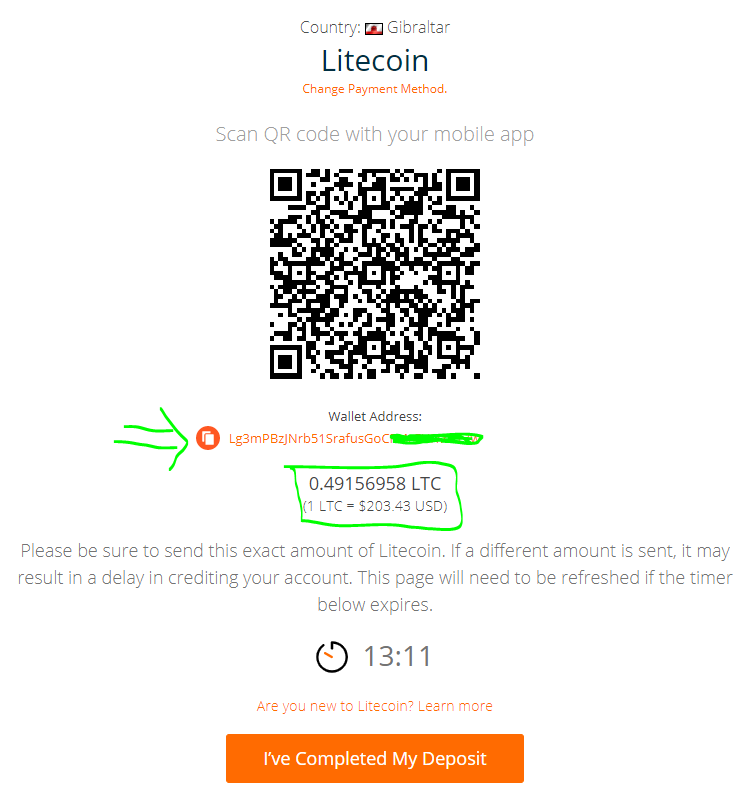
- 10. In Binance, go to Wallet ->Withdraw ->Crypto ->select "LTC". Enter the LTC address and the exact amount that got requested in TigerGaming. The fee is 0.001LTC which gets deducted from the available balance.
- 11. Click "submit" and confirm the deposit in Tigergaming as well. Within a couple of minutes you should have the funds available in Tigergaming - as USD
Withdrawal:
Similar to deposits, you need to request a withdrawal address in Binance - which in Binance is the Deposit address:
https://www.binance.com/en/my/wallet/account/main/deposit/crypto/LTC
Spoiler

