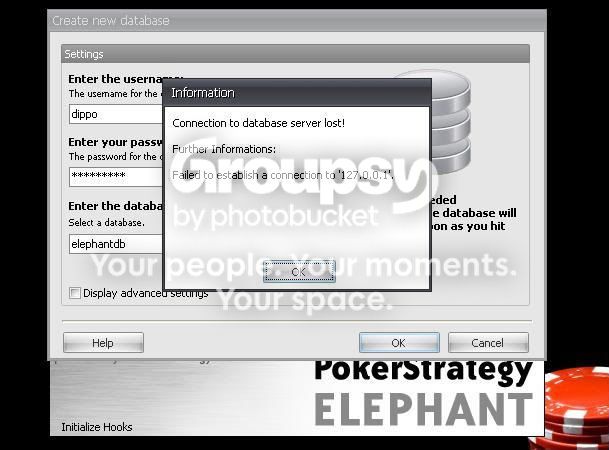
I have a problem. I can't install elephant. I get an error message when it starts installing.
This is the install log, if it helps:
The following properties have been set:
Property: [AdminUser] = true {boolean}
Property: [ProcessorArchitecture] = Intel {string}
Property: [VersionNT] = 5.1.2 {version}
Running checks for package '.NET Framework 2.0 (x86)', phase BuildList
Running external check with command 'E:\DOCUME~1\Ales\LOCALS~1\Temp\VSD57.tmp\DotNetFX\dotnetchk.exe' and parameters '-lcid:1031'
Process exited with code 2
Setting value '2 {int}' for property 'DotNetInstalled'
Reading value 'Version' of registry key 'HKLM\Software\Microsoft\Internet Explorer'
Read string value '6.0.2900.2180'
Setting value '6.0.2900.2180 {string}' for property 'IEVersion'
The following properties have been set for package '.NET Framework 2.0 (x86)':
Property: [DotNetInstalled] = 2 {int}
Property: [IEVersion] = 6.0.2900.2180 {string}
Running checks for command 'DotNetFX\instmsia.exe'
Result of running operator 'ValueExists' on property 'VersionNT': true
Result of checks for command 'DotNetFX\instmsia.exe' is 'Bypass'
Running checks for command 'DotNetFX\WindowsInstaller-KB893803-v2-x86.exe'
Result of running operator 'ValueExists' on property 'Version9x': false
Result of running operator 'VersionLessThan' on property 'VersionNT' and value '5.0.3': false
Result of running operator 'VersionGreaterThanOrEqualTo' on property 'VersionMsi' and value '3.0': true
Result of checks for command 'DotNetFX\WindowsInstaller-KB893803-v2-x86.exe' is 'Bypass'
Running checks for command 'DotNetFX\dotnetfx.exe'
Result of running operator 'ValueNotEqualTo' on property 'DotNetInstalled' and value '0': true
Result of checks for command 'DotNetFX\dotnetfx.exe' is 'Bypass'
Running checks for command 'DotNetFX\langpack.exe'
Result of running operator 'ValueEqualTo' on property 'DotNetInstalled' and value '2': true
Result of checks for command 'DotNetFX\langpack.exe' is 'Bypass'
'.NET Framework 2.0 (x86)' RunCheck result: No Install Needed
Running checks for package 'Visual C++-Laufzeitbibliotheken (x86)', phase BuildList
Running MsiProductCheck with ProductCode '{09298F26-A95C-31E2-9D95-2C60F586F075}'
MsiQueryProductState returned '-1'
Setting value '-1 {int}' for property 'VCRedistInstalled'
The following properties have been set for package 'Visual C++-Laufzeitbibliotheken (x86)':
Property: [VCRedistInstalled] = -1 {int}
Running checks for command 'vcredist_x86\vcredist_x86.exe'
Result of running operator 'ValueGreaterThanEqualTo' on property 'VCRedistInstalled' and value '3': false
Result of running operator 'ValueEqualTo' on property 'AdminUser' and value 'false': false
Skipping FailIf because Property 'Version9X' was not defined
Result of running operator 'VersionLessThan' on property 'VersionNT' and value '5.00': false
Result of checks for command 'vcredist_x86\vcredist_x86.exe' is 'Install'
'Visual C++-Laufzeitbibliotheken (x86)' RunCheck result: Install Needed
Running checks for package 'Windows Installer 3.1', phase BuildList
The following properties have been set for package 'Windows Installer 3.1':
Running checks for command 'WindowsInstaller3_1\WindowsInstaller-KB893803-v2-x86.exe'
Result of running operator 'VersionGreaterThanOrEqualTo' on property 'VersionMsi' and value '3.1': true
Result of checks for command 'WindowsInstaller3_1\WindowsInstaller-KB893803-v2-x86.exe' is 'Bypass'
'Windows Installer 3.1' RunCheck result: No Install Needed
Installation of components 'Visual C++-Laufzeitbibliotheken (x86)' was accepted.
Copying files to temporary directory "E:\DOCUME~1\Ales\LOCALS~1\Temp\VSD57.tmp\"
Copying from 'E:\DOCUME~1\Ales\LOCALS~1\Temp\ckz_8KCU\vcredist_x86\vcredist_x86.exe' to 'E:\DOCUME~1\Ales\LOCALS~1\Temp\VSD57.tmp\vcredist_x86\vcredist_x86.exe'
Verifying file integrity of E:\DOCUME~1\Ales\LOCALS~1\Temp\VSD57.tmp\vcredist_x86\vcredist_x86.exe
WinVerifyTrust returned 0
File trusted
Running checks for package 'Visual C++-Laufzeitbibliotheken (x86)', phase BeforePackage
Running MsiProductCheck with ProductCode '{09298F26-A95C-31E2-9D95-2C60F586F075}'
MsiQueryProductState returned '-1'
Setting value '-1 {int}' for property 'VCRedistInstalled'
The following properties have been set for package 'Visual C++-Laufzeitbibliotheken (x86)':
Property: [VCRedistInstalled] = -1 {int}
Running checks for command 'vcredist_x86\vcredist_x86.exe'
Result of running operator 'ValueGreaterThanEqualTo' on property 'VCRedistInstalled' and value '3': false
Result of running operator 'ValueEqualTo' on property 'AdminUser' and value 'false': false
Skipping FailIf because Property 'Version9X' was not defined
Result of running operator 'VersionLessThan' on property 'VersionNT' and value '5.00': false
Result of checks for command 'vcredist_x86\vcredist_x86.exe' is 'Install'
'Visual C++-Laufzeitbibliotheken (x86)' RunCheck result: Install Needed
Verifying file integrity of E:\DOCUME~1\Ales\LOCALS~1\Temp\VSD57.tmp\vcredist_x86\vcredist_x86.exe
WinVerifyTrust returned 0
File trusted
Installing using command 'E:\DOCUME~1\Ales\LOCALS~1\Temp\VSD57.tmp\vcredist_x86\vcredist_x86.exe' and parameters ' /q:a '
Process exited with code 8191
Status of package 'Visual C++-Laufzeitbibliotheken (x86)' after install is 'InstallFailed'
PLEASE HELP!!!