Skip to forum
Equilab not showing...
 
Notifications
Clear all

Equilab not showing hand chart

9 Posts
4 Users
0 Reactions
5,984 Views

suddenly Equilab's hand selection chart refuses to load... I uninstalled and reinstalled Equilab but clicking on the hand chart loads a blank window that stays hidden behind the main screen. I can load a single hand from that window but not a range of hands.

I am running Windows 10 but don't think that's the issue. the program has worked just fine until today.


Reply
Quote
8 replies
Hesticus
Joined: 24.06.2008

Hi AKfishguide, :welcome:

Welcome to PokerStrategy.com. You should take a moment or two to Introduce yourself! to us properly. Where are you from? In fact, why don't you get yourself added to our Member map. You never know, the nearest PokerStrategist may live right next door. :f_p:

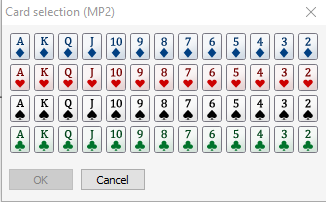
With regards to your question, do you mean this chart:

Or this one:

Have you checked our Equilab tool from PokerStrategy.com? You can download it for free :)

Let me know if downloading this Equilab will resolve your issue.

Cheers,

Hesticus


Reply
Quote

the range selection window - the second one. i just did an uninstall and re install with the exe file at your link - sadly it didn't change my problem. I click on the leftmost button that shows multiple cards but the window showing all possible hands does not load. As I said above a window opens behind the main screen and it is blank and can't be brought to the front.

I am almost thinking that there is a pop up blocker issue but every other popup loads up just fine.


Reply
Quote
Hesticus
Joined: 24.06.2008

Did you start Equilab while playing on PokerStars or any other room?
This is the first time hearing it actually. It might be that there is something within your PC or laptop that causes the issue.

Cheers,

Hesticus


Reply
Quote

I did not have any poker clients open - in the past I could open Equilab before logging into a site or after I was at a table. I live in Alaska and play on Ignition for the most part and have been giving Card Player a try... not liking it.


Reply
Quote
Hesticus
Joined: 24.06.2008

You may try your question here. However, if it doesn't work I would try it on another PC or laptop. Have you tried that?


Reply
Quote

Hi OP,

I had similar issues with Equilab (macbook) but it was due to my 2 monitors I were using. I noticed if I opened the program while connected to my second screen, it worked. However, once I unplugged and tried to open it on my macbook's screen, the same issue happened exactly as you described it. Hope it helps!


Reply
Quote

Oddly enough I had guessed at that same idea but am still traveling. I am now more optimistic that the issue will resolve when I get home and plug in the second monitor. thanks for taking time to write a note!


Reply
Quote
SEXYPOKERPLAYA
Joined: 03.03.2015

hey i had same problem and found what the problem is.

Right click on empty spot on desktop and go to screensettings and change the scale of text and apps percentage to 100 procent. mine was at 125 and it solved it. Regards


Reply
Quote