


So i hear about people multitabling 24 tables ect, i cant see how this is possible with limited screen space? So i know about stacked and cascaded, currently use tiled for 8 tables but i wouldnt be able to do more tiled, can barely see the tables with 4 on each monitor lol. So does anybody have a good explanation on how to use stacked and cascaded at Stars, i like the stacked feature on party poker. I could use that pretty easily. (why dont all sites have this?)
Notifications
Clear all
Questions and Answers
19
Posts
15
Users
0
Reactions
4,212
Views
18 replies


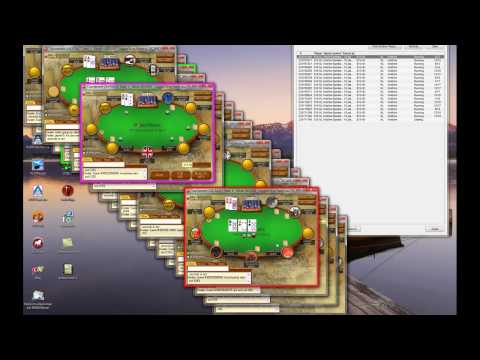
this is maybe the best way. Or just spread them all over the monitor and let them overlap by little. I'd recommend though that you start slowly to play more tables, u cannot jump from 8 to 16 tables instantly and not time out on 1/3 of them.
Ok, so if a table at the back is active and then at the front and overlaps it. How do you not time out?
Also whats that thing on the top right?

Fuck 24 tabling! play 4 or 6 tables and play poker properly. So much more interesting.

currently doing 8 on stars n find it perfect i do my own layouts instead of tile tables or cascade ....

50 tabling, best layout ever 
Just try different layouts and find the one which suits you best
Also Table Ninja is a must-have program if you want to succesfully multitable

Originally posted by Bigniux
50 tabling, best layout ever
Just try different layouts and find the one which suits you best
Also Table Ninja is a must-have program if you want to succesfully multitable
This is a joke right?
Have you got tables stacked up all on top of each other?
How do you remember the action in each room?
Or have you got 50 monitors spread around the room?
I go 9 with a 3x3 grid, I like a small amount of overlap so I can see when they pop to the front, guess I could do more but I enjoy about 9 then slowlylet them drop to a few deep ones
Originally posted by RubyWesson
Can you explain how table ninja works please?
It provides you with hotkeys, so you don't need to click "Fold", "Check"... buttons, you just press preset hotkey. Also, you can set your bet sizes in Table Ninja and you won't have to manually enter them into bet size box everytime you want to bet, they will be entered automatically.
And that's just two great things about Table Ninja, there are way more useful features
I like playing with the tables tiled. This gives me much better reads on my opponents than if I stack the tables. I can see what players do when it is not my turn, and I often take notes on this. Tiling does limit the number of tables and the size of my HUD, but not as severely as you might assume. I can fit 12 tables on one monitor, and since Windows XP, it has been easy to have two monitors connected to one computer.
Yea i preffered tiled but i due to my screen size/resolution i can only get 4, im finding that the only annoying thing after playing stacked is dont get to see showdowns and how players react

Well this just a thought
I don't know wether this is possible in windows xp or not.
But maybe using something like multiple virtual desktop
and also an apps like compiz like in linux would be a great benefit so you could zoom and pan your desktop, auto snap your window, virtual desktop,etc..
check the video:
Well you get the picture which effect would really help multi tabling.
You could just try google them, there might be something similar effect for windows 7.


Tiled is ok and you can follow more action, but I find when I want to go with more than 12 tables I really need to stack them.
This might take some getting used to(at least it did for me) but once you do it you can put in more volume very easily.
I suggest only stacking when you feel you can beat a limit pretty well, since I think you can learn more when you are playing tiled.
If I can multitable 14 tables on a 15" screen then you can too. Just practice.
When I started out, I added tables because of boredom, I was too impatient to play just one and started making spewy moves. When I was playing 3 tables and talking on the phone it was like "OMG I'm so cool, playing 3 tables is nuts, I must have napoleonesque multi-tasking skills". Then I played 4, then 6, then 9, and 12, which is the number I'm currently doing ok with but I can add 2 or 3 more if needed.

Yh spread it like aruniux does but across two monitors ♠_biggrin:.Then u can have 24 tables goin at the same time and u wont miss any action too.