Calculate your Omaha equity with the PokerStrategy.com Equilab Omaha
This great software is based on our successful Hold'em Equilab and is the best standalone tool in the world for Omaha. With this program, you will be able to calculate the equity between hands but also between ranges, something which has not been done before for Omaha in such an easy way.
PokerStrategy.com Equilab Omaha will help you take your game to the next level - this software can be a powerful support tool if used well.
Note: While this tool is a great addition to an Omaha player's arsenal, please be advised that a good understanding of the Omaha and equity basics are required. You can of course get some assistance by going to Help -> Syntax documentation and samples.
Download the PokerStrategy.com Equilab Omaha for free
Please note: You can use the software to practice and analyse your hands, but it's not allowed to have the software open while playing at the tables on PokerStars
Getting started with the PokerStrategy.com Equilab Omaha
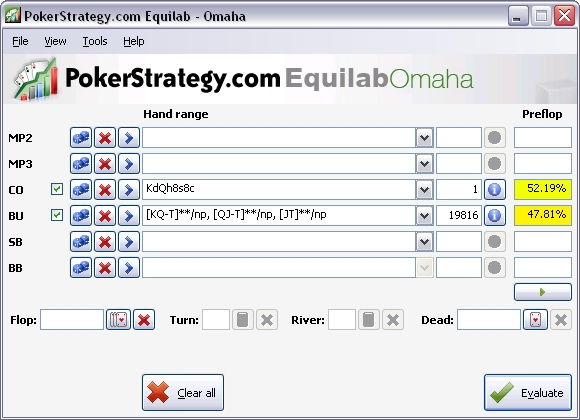 The main window enables you to calculate your equity based on various filters. In order to calculate equity, you must enter the hands or hand ranges of at least two players.
Once you have set the filters you want, just click "Evaluate" and the equity percentages will be displayed next to each player's hand. You can also calculate your equity on the flop, turn or river.
Video: Introduction to Equilab Omaha
Range Selection and Range Explorer
Besides comparing your hand's equity against another hand, PokerStrategy.com Equilab Omaha can show you your equity against ranges. No other software on the market can compare ranges, which makes this tool that much more valuable.
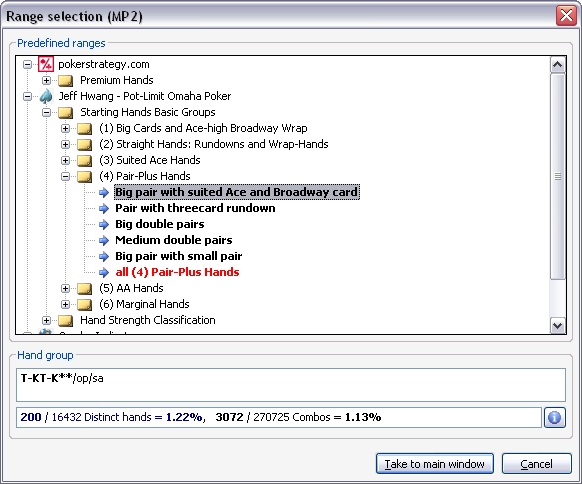
All you have to do is to click on the ">" button, then choose "Range selection". A pop-up window will open (see screenshot below) and you will be able to choose from a set of predefined ranges.
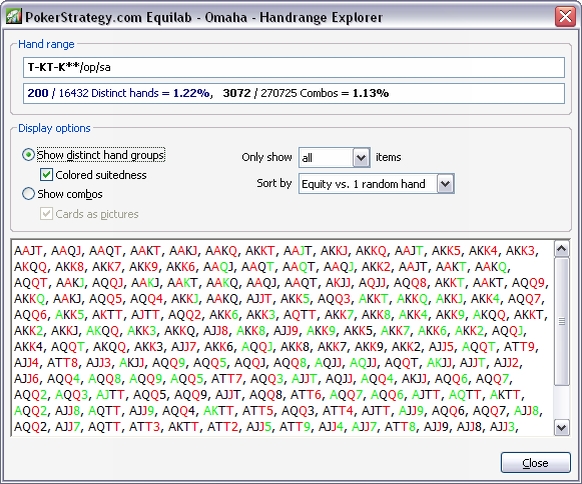
Clicking on the information button next to your hand in the main window will open the Range explorer, where all the combinations that make up your range will be displayed.
 |
 |
Equity Graph
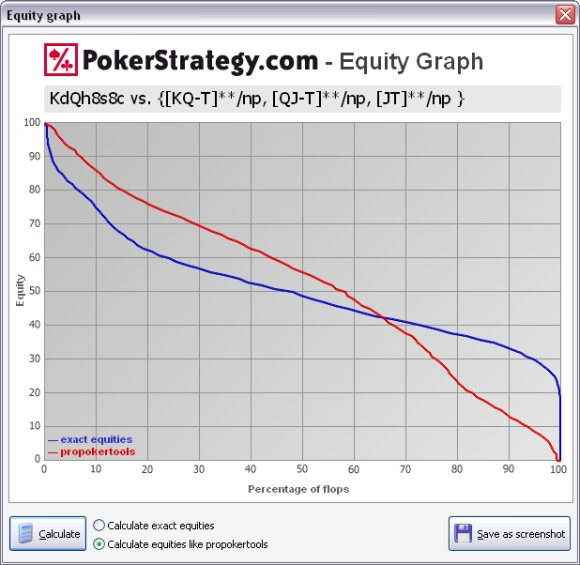 The Equity Graph shows you how your equity will look like on the next street. The information will be generated as a graph, so you could better see how your overall equity looks like.
If we look at the screenshot below, we see that our hand, KdQh8s8c, has approximately 40% equity on the flop 70% of the time against the selected range.
Hand vs. Hand Analyser
 This tool allows you to compare two different hands in a more detailed fashion.
Simply input the cards for each hand and you will get a detailed analysis of their equity versus themselves. On top of that, you will also see how your hand performs in a multi-way pot.
Download the PokerStrategy.com Equilab Omaha for free
Flop Outs Counter
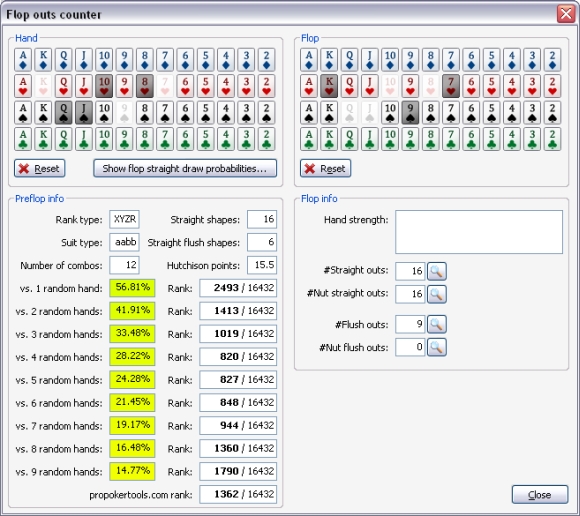 Another tool from the PokerStrategy.com Equilab Omaha is the Flop Outs Counter. As the name suggest, this tool is a great help when it comes to seeing how many outs you have on the flop.
All you have to do is to select a hand and a flop. Once you've done that, you'll get information on how many straight or flush outs you have, including the outs for the nut flush/straight. You can also get to see your equity against 100% ranges, but also straight draw probabilities on the flop.
Any questions or feedback about the PokerStrategy.com Equilab Omaha?
We want to hear your opinion about our new software, so don't hesitate and send us feedback or any questions you might have. Have you tried it yet? Are you going to try it? Did you encounter any problems so far? Share your thoughts in our dedicated forum: