



Hello, I payed Douglas Zare by PayPal for ICM Explorer tool registration. I wrote an email to him on top of that. And now about a week pased and i still don't get an answer from him. I think he should give me a link or something. Anybody had this issue?
Notifications
Clear all
12 replies


Hi lukposk,
Welcome to the PokerStrategy.com English community forum! 
I'm going to take a wild guess that he is away.
If you're worried, you might contact PayPal to see what your options are regarding reversing the payment.
All the best,
 VS
VS
I have just started to wonder if I would receive it at all.
So I should just give him more time and he will eventually respond?
Hi lukposk,
I actually do not know, and just judging by his website, he is just an individual person, not a company with staff.
Even so, I'm surprised that he hasn't answered his email. There are rather few situations where a person has no access to internet nowadays.
ICM Explorer is not one of the poker tools that have a relationship with PokerStrategy.com, so there really isn't anyone here to assist you.
Send an email to PayPal customer service to see if you can put the payment on hold.
You might try checking your junk email to see if perhaps he did reply and his reply got put there.
After that, I'm out of suggestions...
Best of luck,
VS


@lukposk Before i go to party just catched up that thread.
1st red flag the installer is detected as a ransomware ... ( wich do not necessary means it is ...)
2nd red flag ICM running under XP ? For sure the supposed tool isn't up to date ...
3rd red flag Paid only via paypal ? Sounds more like a scam to me ...
4th red flad it's a very old tool according to net forums doesn't looks like it's a good sign to me.
Don't have much time to run it on a VM to check inside but if you not in hurry will do next week.
If you have no answer until i look into let me know it , if it's simply a registration with a serial code it'll be fast to get you one for free ... Well assuming it's not a ransomware or outdated tool else it won't be of any interest for you or other players.
Best of Skills & Luck @ Tables,
OldSchoolPapa.

Good Night or Morning.
I just come back from party and with the mix of meds / drinks & weed i'm pretty high and cannot sleep so i remembered that thread and looked into it 15 Min ago.
The good news is that it's not a ransomware. The bad one is that the piece of software is shitty and kind of a scam wich i will explain why later if i don't forget.
Anyway the interface is poor for a software you are supposed to buy.
If anyway you don't get a registration wich i highly doubt you will even if the software has been mentionned in a poker book litterature. ("Likewhat poker book writers should be more careful about their Educated Pieces of Advice")
Then you can enable the controls for the prize pool & nash. Different ways possible to do it.
You can an advanced task manager called Process Hacked , it's legit and open-source before i see any red flag.
Then you select the process ICM Explorer , Right Click on it , Miscallenous , Windows
A new window will popup , scroll down to then end of it and right click on one of the last , should be wrote "ComboBox".
Then Right Click and Enabled , Right Click again then Visible. Almost the same for the nash button.
Output:
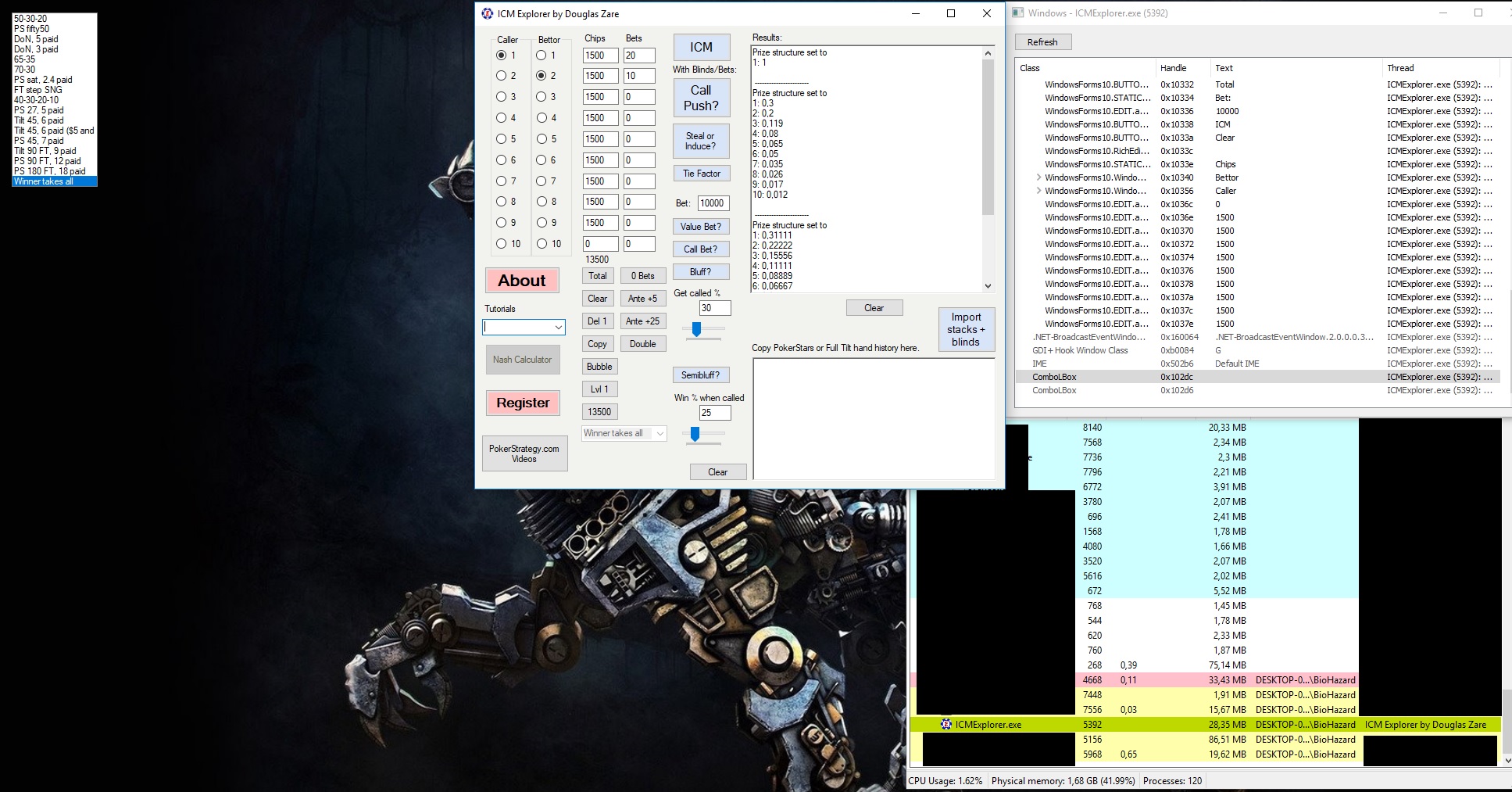
On the left of the screen you get your listbox
Second way is for advanced users.Won't detail it all coz if you don't get it you will just mess it up for nothing.
You use a tool called Reflector to decompile the shitty software and you look for combobox2 then with the plugin Reflexil you modify the State of the control and save it. Then it's Patched.
Output:
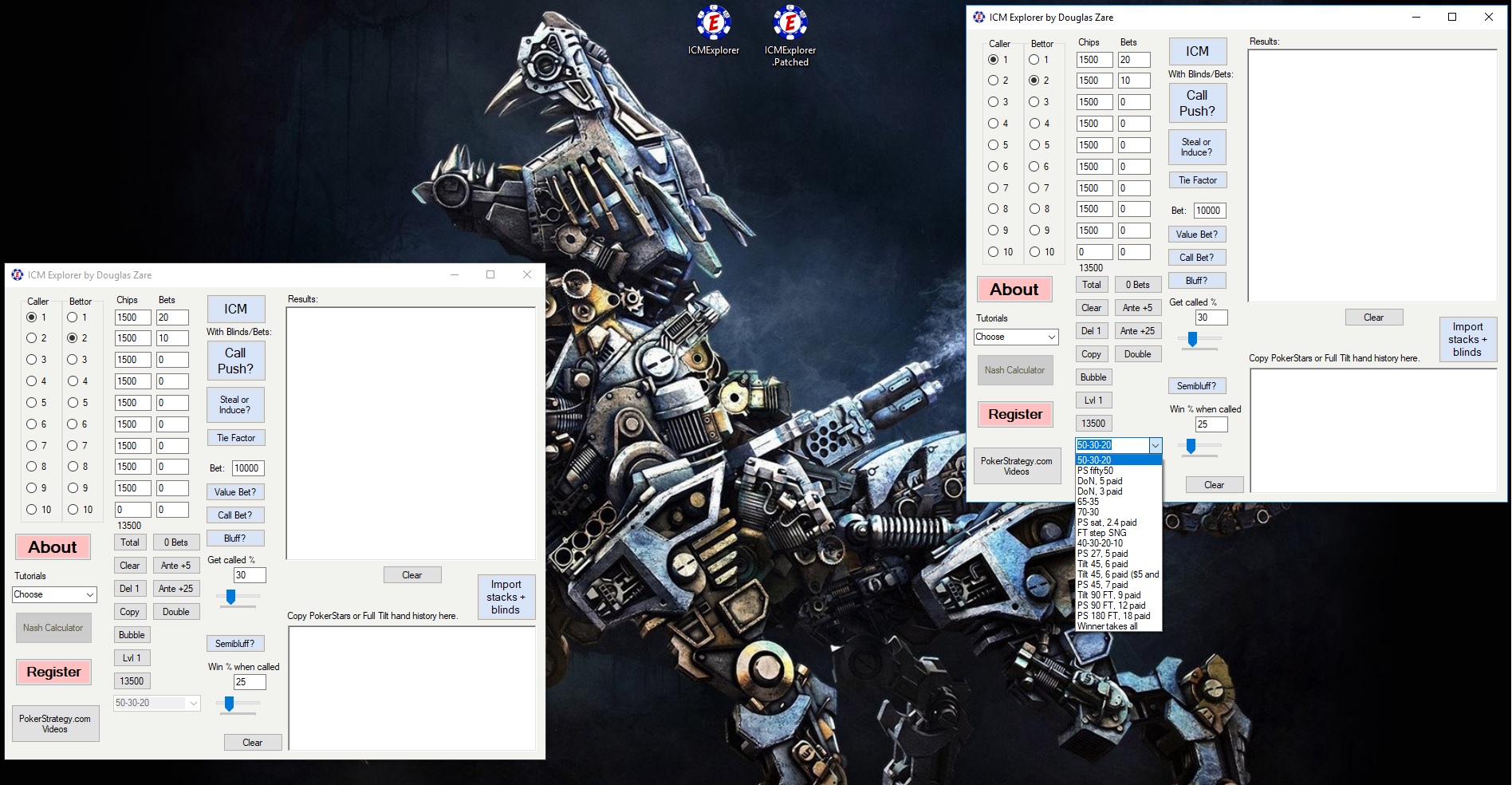
On the left the normal one you download , on the right once patched
Now why do i say it's a scam or one of those two options , you falled into the con or you are setting a con to make peoples fall-in.
I don't say that because there is no anti-debugger function , the software has no installer , the tool isn't packed neither because the source code isn't obfuscated.
But simply because Nash function send a query to HoldemResources.Net so basicaly if you really got scammed you paid for the free version of the online calculator. Why do i think That ("Afterall i'm an A$$hole who don't care about ICM and don't think getting any edge using it too often") ?
Because of the source code.
Output:
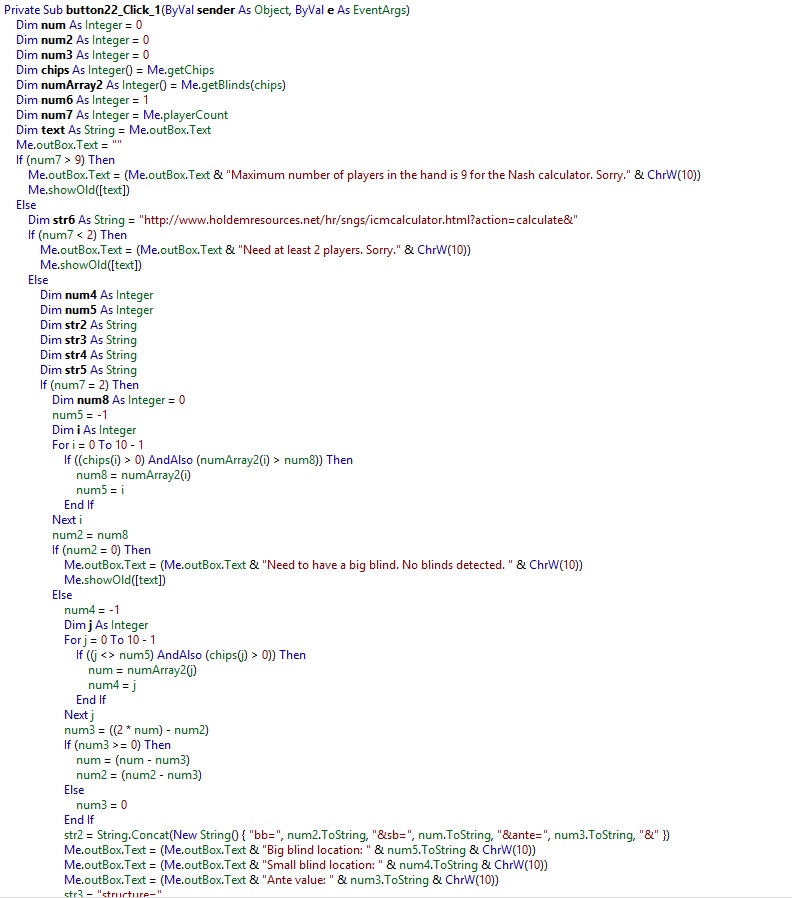
Well that's it, if i'm not too high it should have a little sens...
Best of Skills & Luck @ Tables,
OldSchoolPapa.
Thanks for all that, but still having problem here.
"Then you select the process ICM Explorer , Right Click on it , Miscallenous , Windows"
There is Miscellaneous option but no "Windows" to choose.
@lukposk
Sounds Obvious but make sure you ran ICM Explorer in the backgroud before ....
- Right Click on ICM Explorer process inside Process Hacker Main Window
- Scroll Down until you See ICM Explorer.exe the right click on it
- Miscallenous
- Windows
- Once A New window popup
- Scroll Down
- You will See a ClassName Called "ComboLBox"
- Right Click on it Then Visible
- Right Click on it Then Enable
You should see the same result and windows that on my first screenshot.
If not you missed a step.
Best of Skills & Luck @ Tables,
OldSchoolPapa.
Look I obviously start ICM explorer then start Process Hacker, find ICM Explorer and there is no "Windows" option to choose when I right click on ICMExplorer. There is only:
"Detach from debugger"
"GDI handles"
"Inject DLL..."
"Page priority"
"Reduce working set"
"Run as..."
"Run as this user..."
Its Windows7 maybe different way to do things?
Originally posted by lukposk
Look I obviously start ICM explorer then start Process Hacker, find ICM Explorer and there is no "Windows" option to choose when I right click on ICMExplorer. There is only:
"Detach from debugger"
"GDI handles"
"Inject DLL..."
"Page priority"
"Reduce working set"
"Run as..."
"Run as this user..."Its Windows7 maybe different way to do things?
I Just ran it in Win7 Compatibility Mode and it works the same. You can also try to run it as admin.
(Make Sure you downloaded the last version wich is V2.39)
- Move your Process Hacker window on the top side of your screen("not in full mode") because since ICMExplorer.exe is one of the last process depending your screen resolution a part of the right click menu might be not visible.
- If you still don't see it , make a screenshot and upload it here so i might have a better idea of your problem.
- i could upload the patched version directly but it wouldn't be appropriate on the forum and would be on a grey zone from the legit side ...
You can also try that way.
-Click on on ICMExplorer.exe in the Process Hacker Window to make sure you ran it.
-On top menu click on "View"
-"Windows"
Then apply the same lines i explained before , should do the job.
@lukposk Good To Hear 
Might The Cards Stand By Your Side. 
Best of Skills & Luck @ Tables,
OldSchoolPapa.