Skip to forum
Questions about Equ...
 
Notifications
Clear all

Questions about Equilab

11 Posts
2 Users
0 Reactions
3,732 Views
JoeB1Knoobie
Joined: 13.10.2021

Hi, I've searched the forums and the internet in general and can't find any answers to the following questions. I'm curious about the "Select Preflop Action" buttons. There are options to Limp and Call there, and each has a bunch of sub-options. What do they mean?
For example:
Select Preflop Action > Limp > 25 /15 or Select Preflop Action > Limp > 50 /10
What do the numbers like 25/15 and 50/10 mean? Is that supposed to be the VPIP/PFR of the villain we're trying to read? Something else?

Note: I'm not allowed to post external links, because I'm too new. I've got screenshots of what I'm asking about shared on dropbox, just now way to link them here.


Reply
Quote
10 replies
JoeB1Knoobie
Joined: 13.10.2021

Oh, There's also Select Preflop Action > Call which has similar but differently formatted numbers in the list.
Select Preflop Action > Call > 1 : 5 or Select Preflop Action > Call > 1 : 9

What do the numbers represent?


Reply
Quote
Super Moderator
VorpalF2F
Joined: 02.09.2010

Hi JoeB1Knoobie,
Welcome to PokerStrategy.com :welcome:

I checked, and I cannot find those buttons.

You might be using Power Equilab
If so, post your question in this thread:
https://forums.pokerstrategy.com/forum/thread.php?postid=2003077#post2003077
(you might want to scan through the thread to see if your question is already answered)

If you upload the screenshots to an image hosting service it is possible to work around the image restriction.
Get the URL to the picture, then put it in your post without the http://
Mods seeing such things will often fix it.

Cheers,
VS


Reply
Quote
JoeB1Knoobie
Joined: 13.10.2021

Hey VorpalF2F, thanks for getting back to me! This is just the free equilab, not power-equilab. Here are links to the screenshots, via the workaround you suggested (thanks for that tidbit!):

Just add the HTTPS: in front


Reply
Quote
Super Moderator
VorpalF2F
Joined: 02.09.2010

OK I see what you mean now.
I have no clue :coolface:

I'll see if I can find an explanation somewhere.
If (or when) I do I'll let you know...


Reply
Quote
Super Moderator
VorpalF2F
Joined: 02.09.2010

I think I figured it out.
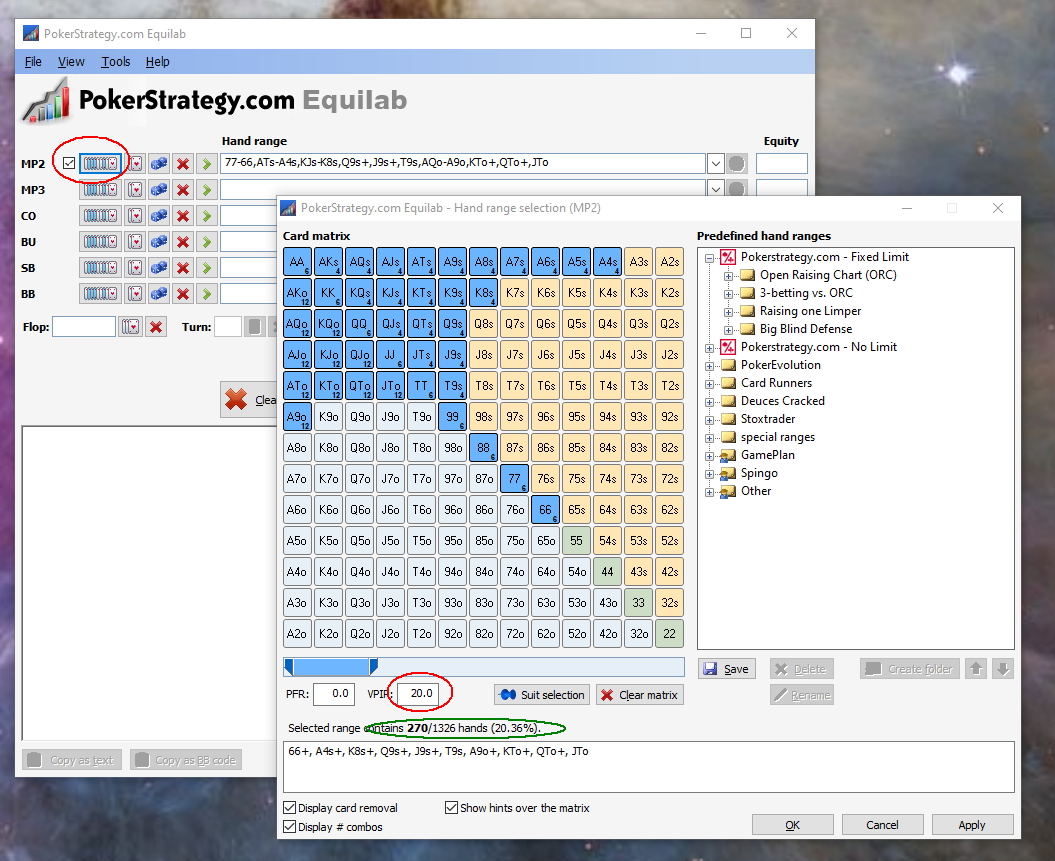
If you open the card range selector and put 20.0 in the VPIP box (red circles)
You will see a range that is 20% of all combos

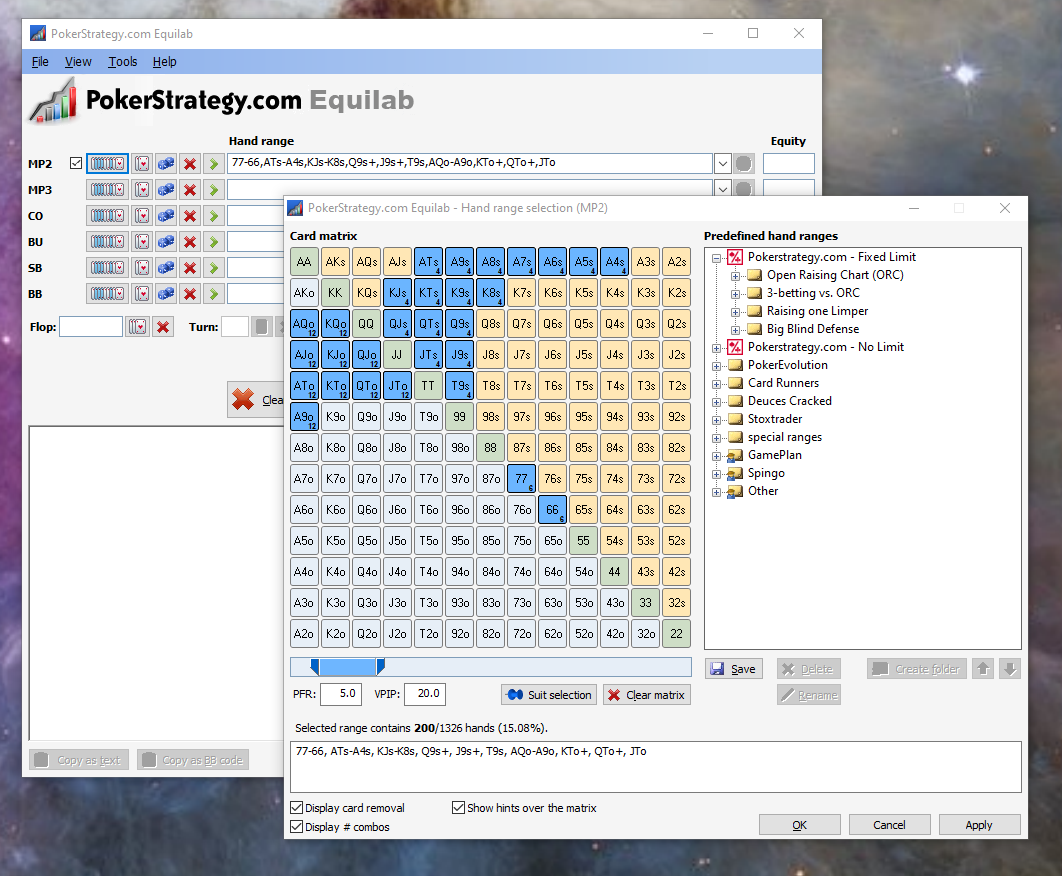
If you now put 5.0 in the PFR box, you will eliminate the top 5% of hands from this whole range:

This is exactly what you get if you choose the Limp 20/5 option from the Select Preflop Action button

As for the call numbers, they look like ratios, but they are all odd numbers:
1:3, 1:5 ... 1:9

Here is 1:3 vs the 20/5 range:

       Equity     Win     Tie
MP2    61.51%  60.43%   1.08% { 66+, A8s+, KTs+, QTs+, JTs, ATo+, KJo+ }
MP3    38.49%  37.42%   1.08% { TT-22, K9s+, Q9s+, J8s+, T8s+, 97s+, 87s, 76s, 65s, KJo+, QTo+, JTo, T9o, 98o }

Here is 1:5 vs the same range:

       Equity     Win     Tie
MP2    64.58%  63.59%   0.98% { 66+, A8s+, KTs+, QTs+, JTs, ATo+, KJo+ }
MP3    35.42%  34.44%   0.98% { 99-22, K2s+, Q2s+, J6s+, T7s+, 96s+, 86s+, 75s+, 65s, 54s, A8o-A2o, K8o+, Q8o+, J8o+, T8o+, 97o+, 87o, 76o }

Not making much sense to me at the moment.


Reply
Quote
Super Moderator
VorpalF2F
Joined: 02.09.2010

These might have something to do with Fixed Limit Hold'em

Clue:
If you open the "PokerStrategy.com - Fixed Limit" section of the Predefined hand ranges panel, then open "Raising one Limper" you will see the same limp profiles we saw previously.

That's just a guess though


Reply
Quote
JoeB1Knoobie
Joined: 13.10.2021

Awesome. Thanks for the help!

So, here we're assuming that calling caps the range, so the tool gives us access to quickly cap the range based on VPIP/PFR. I assumed it had something to do with that, but didn't have any idea how to figure out the exact connection. Now that I see how you worked it out, I'm like "duh, why didn't I think of that" ;-)

Regarding limp, I think you're probably on to something because in the user manual they say something along the lines of "These ranges are mostly based on limit hold'em, for no limit you should choose your ranges from the list of predefined ranges in the Hand Range Selection window."

Kewl. Thanks again!


Reply
Quote
Super Moderator
VorpalF2F
Joined: 02.09.2010

Originally posted by JoeB1Knoobie
Awesome. Thanks for the help!

So, here we're assuming that calling caps the range, so the tool gives us access to quickly cap the range based on VPIP/PFR. I assumed it had something to do with that, but didn't have any idea how to figure out the exact connection. Now that I see how you worked it out, I'm like "duh, why didn't I think of that" ;-)

Regarding limp, I think you're probably on to something because in the user manual they say something along the lines of "These ranges are mostly based on limit hold'em, for no limit you should choose your ranges from the list of predefined ranges in the Hand Range Selection window."

Kewl. Thanks again!

Wait...
There's a user manual?
Why wasn't I notified!

Where did you find it?


Reply
Quote
JoeB1Knoobie
Joined: 13.10.2021

oof, my bad. I shouldn't have called it a "User Manual". This is all I was able to find https://www.pokerstrategy.com/strategy/various-poker/equilab-boost-skills/


Reply
Quote
Super Moderator
VorpalF2F
Joined: 02.09.2010

Wow!
Nice find.
I'm pretty sure I had never seen that page before.
I've saved that link for the next time someone needs it.


Reply
Quote