Skip to forum
[OFFICIAL Support T...
 
Notifications
Clear all

[OFFICIAL Support Thread] Power-Equilab - Equity calculation tool

346 Posts
81 Users
46 Reactions
175.3 K Views
nopi
Joined: 18.08.2006

Originally posted by theEnot
Hi, can someone explain?

Range 1: AA-55,AKs-A2s,KQs-KTs,QJs-QTs,JTs,T9s,98s,AKo-AJo,KQo,[50]44-22,97s,ATo,KJo[/50],[50]K9s,Q9s,J9s,T8s,87s,76s,65s,QJo[/50],[20]54s[/20]
Range 2: TT-77,AQs-ATs,KQs-KJs,QJs,JTs,AQo,[10]AA-KK,A7s[/10],[50]QQ,55-44,A9s,KTs,QTs,T9s,98s,87s[/50],[75]JJ,66,AKo[/75],[25]33-22,AKs,A8s,A5s-A3s,J9s,T8s,76s,65s,54s,KQo[/25]
Board: 4d3c2c

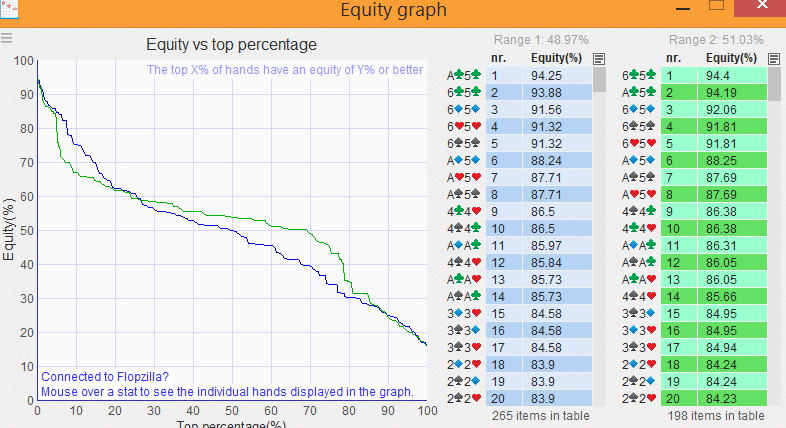
Results in Equilab:

Spoiler

Board: 4d3c2c
Equity Win Tie
MP2 48.58% 45.95% 2.63% { <b>100: </b>55+, A2s+, KTs+, QTs+, JTs, T9s, 98s, AJo+, KQo,<b> 50: </b>44-22, K9s, Q9s, J9s, T8s, 97s, 87s, 76s, 65s, ATo, KJo, QJo,<b> 20: </b>54s }
MP3 51.42% 48.78% 2.63% { <b>100: </b>TT-77, AQs-ATs, KJs+, QJs, JTs, AQo,<b> 10: </b>KK+, A7s,<b> 75: </b>JJ, 66, AKo,<b> 25: </b>33-22, AKs, A8s, A5s-A3s, J9s, T8s, 76s, 65s, 54s, KQo,<b> 50: </b>QQ, 55-44, A9s, KTs, QTs, T9s, 98s, 87s }

Results in Fz (and crev):

Spoiler

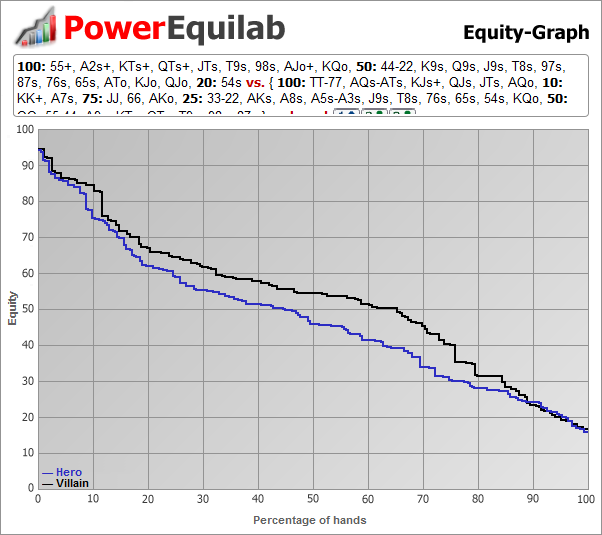
Equity is different. Graphs is critically different.
Weights is similar, but results aren't. Why?

Hi theEnot,

you're right, there were some small deviations while calculating with nested, weighted ranges. This is solved in the newest version 1.10.13.0.

The second thing is the equity graph. We are pretty sure, that the visualizing in the Power-Equilab is correct.
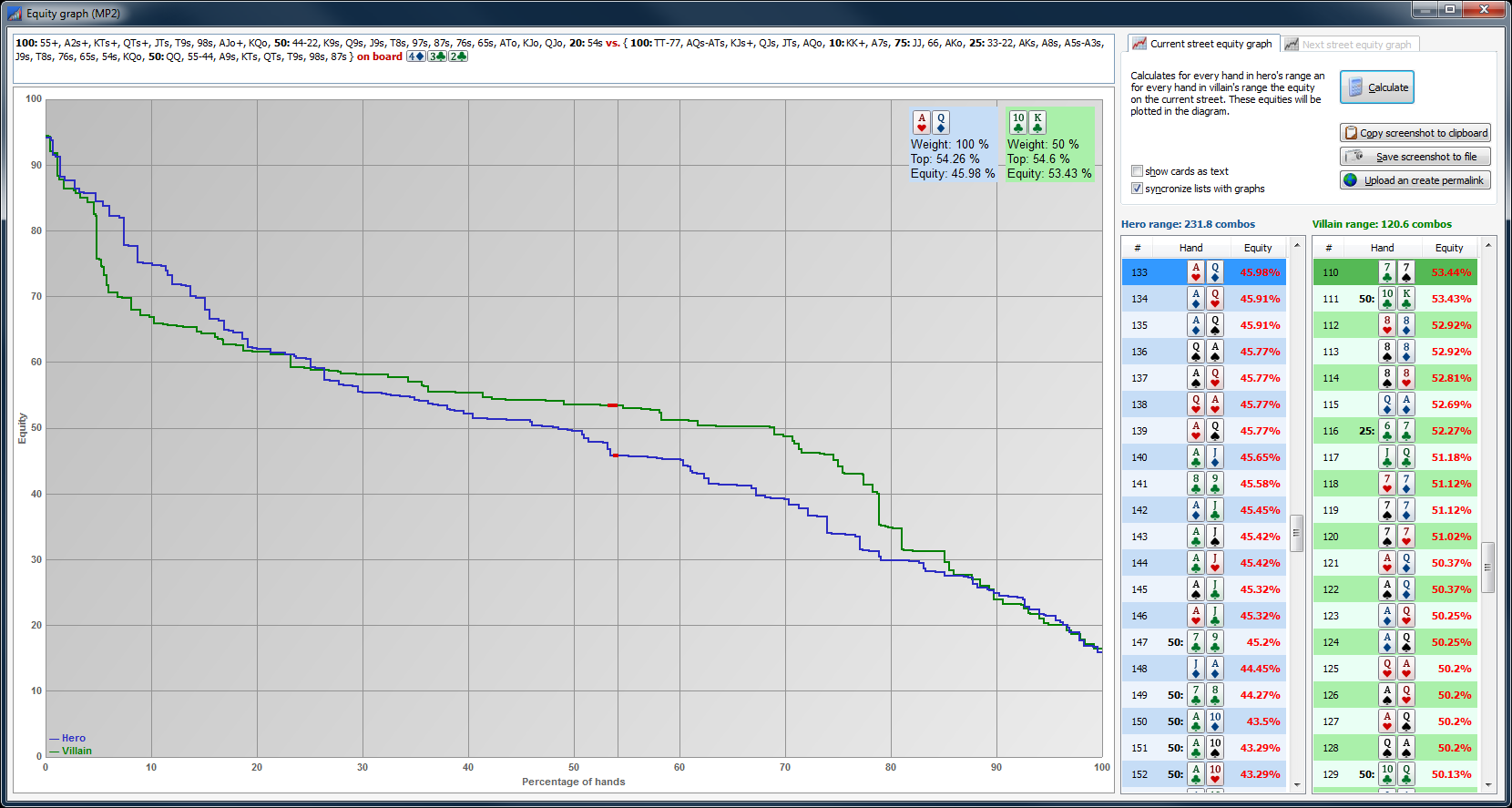
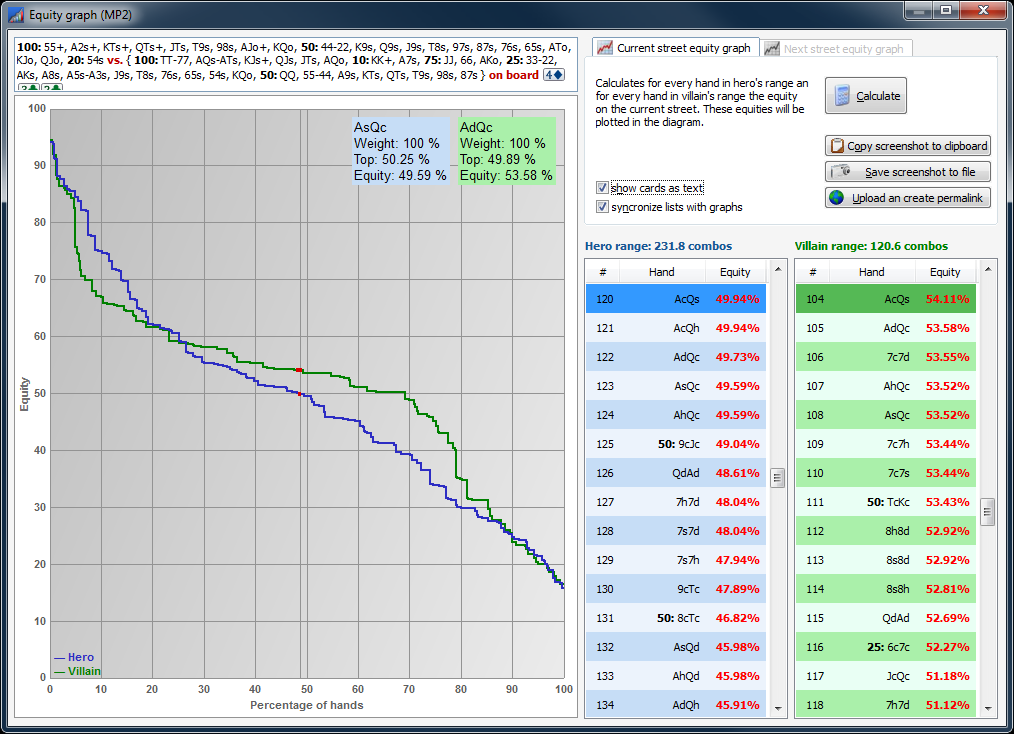
We have no ides in which manner the holdeq paint the values, but it seems to be a litte weired. Please take a look to the follwing screenshot:
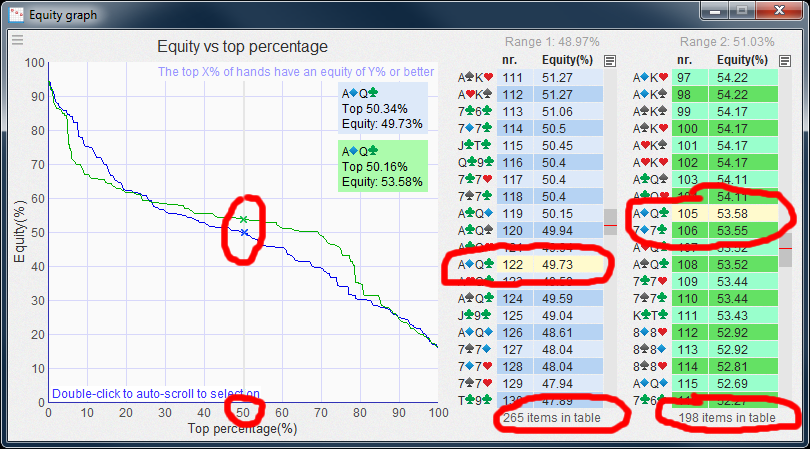
As you can see, we have moved the cursor exact to 50%. We would expect, that the expected values is 50% out of 265 items = 132 or 133. but here is visualised no 122. The same for the right side: 105 instead of 50% of 198 = 99.
We think the differences are caused by the different painting methods.

best regards, nopi


Reply
Quote
theEnot
Joined: 27.09.2011

Thanks for reply.


Reply
Quote
theEnot
Joined: 27.09.2011

Wait a minute...

We would expect, that the expected values is 50% out of 265 items = 132 or 133. but here is visualised no 122. The same for the right side: 105 instead of 50% of 198 = 99.

Some hands have weight. Therefore 50% should not be 265/2 (or 198/2). So there are no mistake.
Different painting methods should not be problem. We have same axis (equity and % of hands), same ranges and two different graphics. Therefore one graphic is good, one is wrong.

We need 3rd programm... :f_rolleyes:


Reply
Quote
theEnot
Joined: 27.09.2011

I took same ranges, but without weights.

Range 1: AA-55,AKo-ATo,KQo-KJo,QJo,AKs-A2s,KQs-K9s,QJs-Q9s,JTs-J9s,T9s-T8s,98s-97s,[100]44-22[/100],[100]87s,76s,65s[/100],[100]54s[/100]
Range 2: TT-77,AQo,AQs-ATs,KQs-KJs,QJs,JTs,[100]AA-KK,A7s[/100],[100]QQ,55-44,A9s,KTs,QTs,T9s,98s,87s[/100],[100]JJ,66,AKo[/100],[100]33-22,KQo,AKs,A8s,A5s-A3s,J9s,T8s,76s,65s,54s[/100]
Board: 4d3c2c

Graphs:

Spoiler

Now they are the same. And...

you're right, there were some small deviations while calculating with nested, weighted ranges.

I think equilab have some error in weights, because previous graphs (with weights) similar but kind of is displaced along the x axis.


Reply
Quote
theEnot
Joined: 27.09.2011

Another example why equilab has an error. Without comparing to another programm.

Range 1: 77+,ATs+,A5s-A2s,KTs+,QTs+,JTs,T9s,98s,AJo+,KQo
Range 2: JJ-55,AQs-A2s,K8s+,Q8s+,J8s+,T8s+,97s+,87s,76s,ATo+,KJo+
Board: Ad7hTc
Graph:

Spoiler

Ok, now we delete all high equity hands in 1st range.
Range 1: KK-JJ,99-88,KJs+,QJs,98s,KQo
Range 2: JJ-55,AQs-A2s,K8s+,Q8s+,J8s+,T8s+,97s+,87s,76s,ATo+,KJo+
Graph:

Spoiler

Now we in 1st range have hands with low equity only and graph seems legit. Ok.

Now we ad those hands which we deleted by only 1%.
Range1: 100:KK-JJ,99-88,KJs+,QJs,98s,KQo,1:AA,TT,77,ATs+,A5s-A2s,KTs,QTs,JTs,T9s,AJo+
Range2: JJ-55,AQs-A2s,K8s+,Q8s+,J8s+,T8s+,97s+,87s,76s,ATo+,KJo+
Graph:

Spoiler

And this is ridiculous result.

Please fix this.


Reply
Quote
nopi
Joined: 18.08.2006

Hi theEnot,

many thanks for your hints.
You're right, the values should be painted proportional to it's weights. We will fix it in the next days.
So far, all the values are painted in the same width and this is not correct.

best regards, nopi


Reply
Quote

Originally posted by nopi
Thanks for the suggestion. I think this is not a big thing ... but, i'm sorry, i always thought, that the tie-equity is important, because you get a part of the pot and this is part of your winnings.

I discussed this with a few poker statisticians / app developers and poker geniuses, we all agreed that there was no logical reason to determine equity without tie-equity. With that said I see nothing wrong with including this as an option, provided that tie-equity is always the default. Good choice!


Reply
Quote

The board located in the Hand Range Selection window's Equity/Range tab does not update if we change the Flop in the main Power-Equilab window. This would be standard UI behavior if the Hand Range Selection window was designed to be modal, but it is nonstandard as a modeless window. The easy way to correct this error is to make the Hand Range Selection window modal, obviously I would prefer that the window remain modeless and the Equity/Range tab automatically update when changes are made to the main application window in the background.


Reply
Quote
nopi
Joined: 18.08.2006

Originally posted by nopi
Hi theEnot,

many thanks for your hints.
You're right, the values should be painted proportional to it's weights. We will fix it in the next days.
So far, all the values are painted in the same width and this is not correct.

best regards, nopi

Hi theEnot,

please check out the newest version 1.10.14.0.

best regards, nopi


Reply
Quote
nopi
Joined: 18.08.2006

Originally posted by TowerHill
The board located in the Hand Range Selection window's Equity/Range tab does not update if we change the Flop in the main Power-Equilab window. This would be standard UI behavior if the Hand Range Selection window was designed to be modal, but it is nonstandard as a modeless window. The easy way to correct this error is to make the Hand Range Selection window modal, obviously I would prefer that the window remain modeless and the Equity/Range tab automatically update when changes are made to the main application window in the background.

Hi WowerHill,

please check out the newest version 1.10.14.0.

best regards, nopi


Reply
Quote
nopi
Joined: 18.08.2006

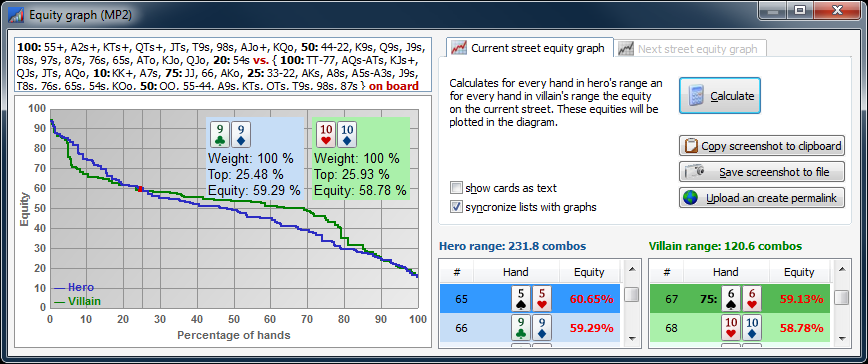
Version 1.10.14.0 is out now.

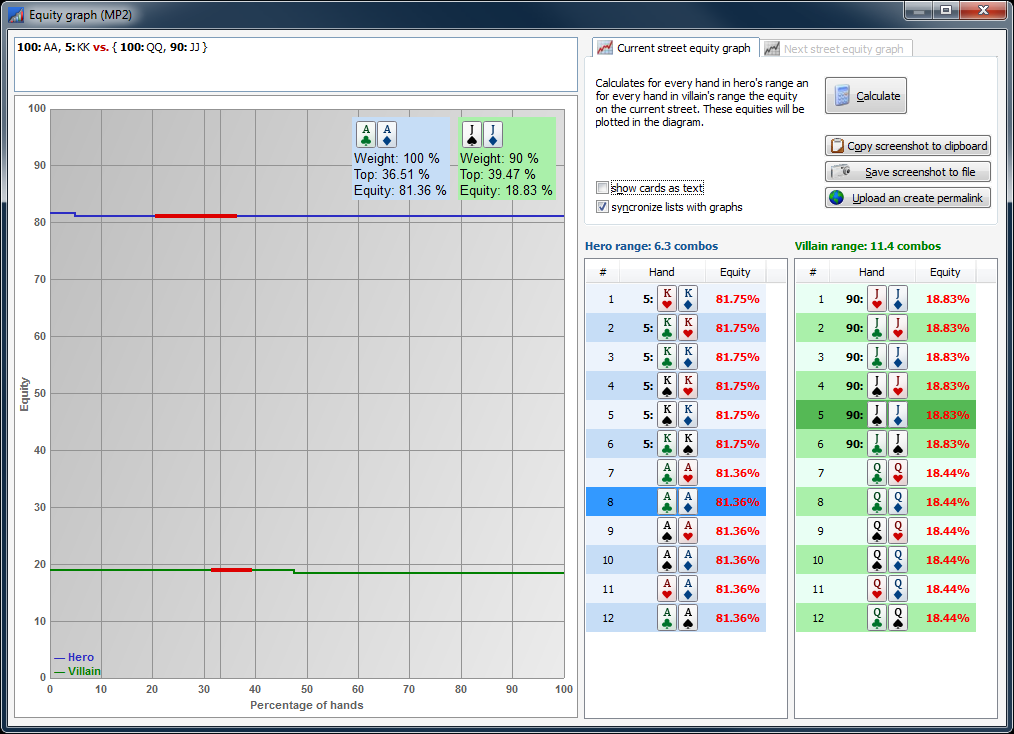
Equity graph:
List of hands for heads up current street equity graph. Better mouse over information.

Fully resizable window and graph to support high resolution monitors.

Switsching between "cards as text" and "cards as bitmaps":

Weighted values are now painted proportional to it’s weiths.
Automatically syncronizing between graph and list of hands:

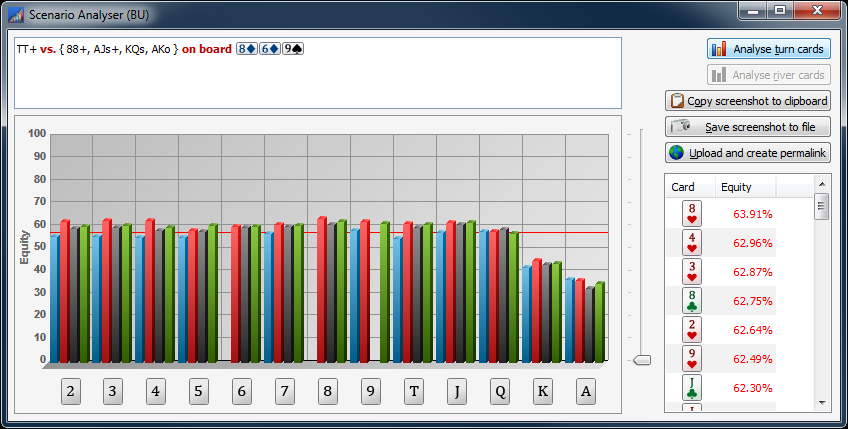
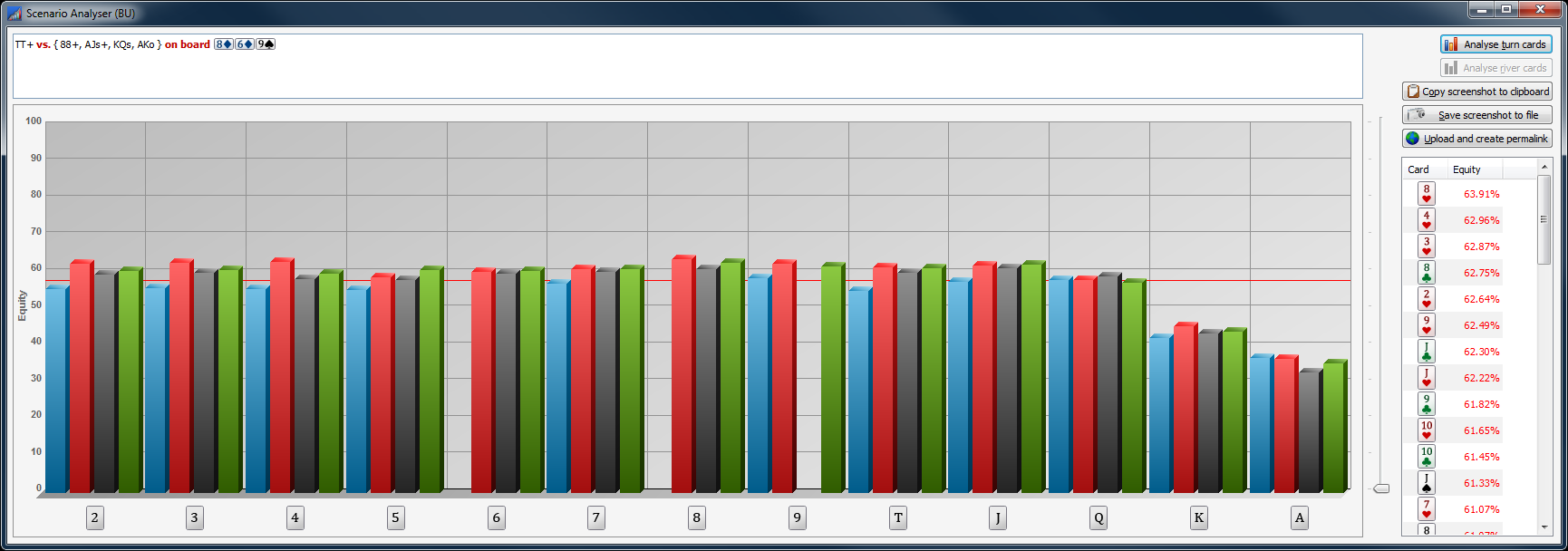
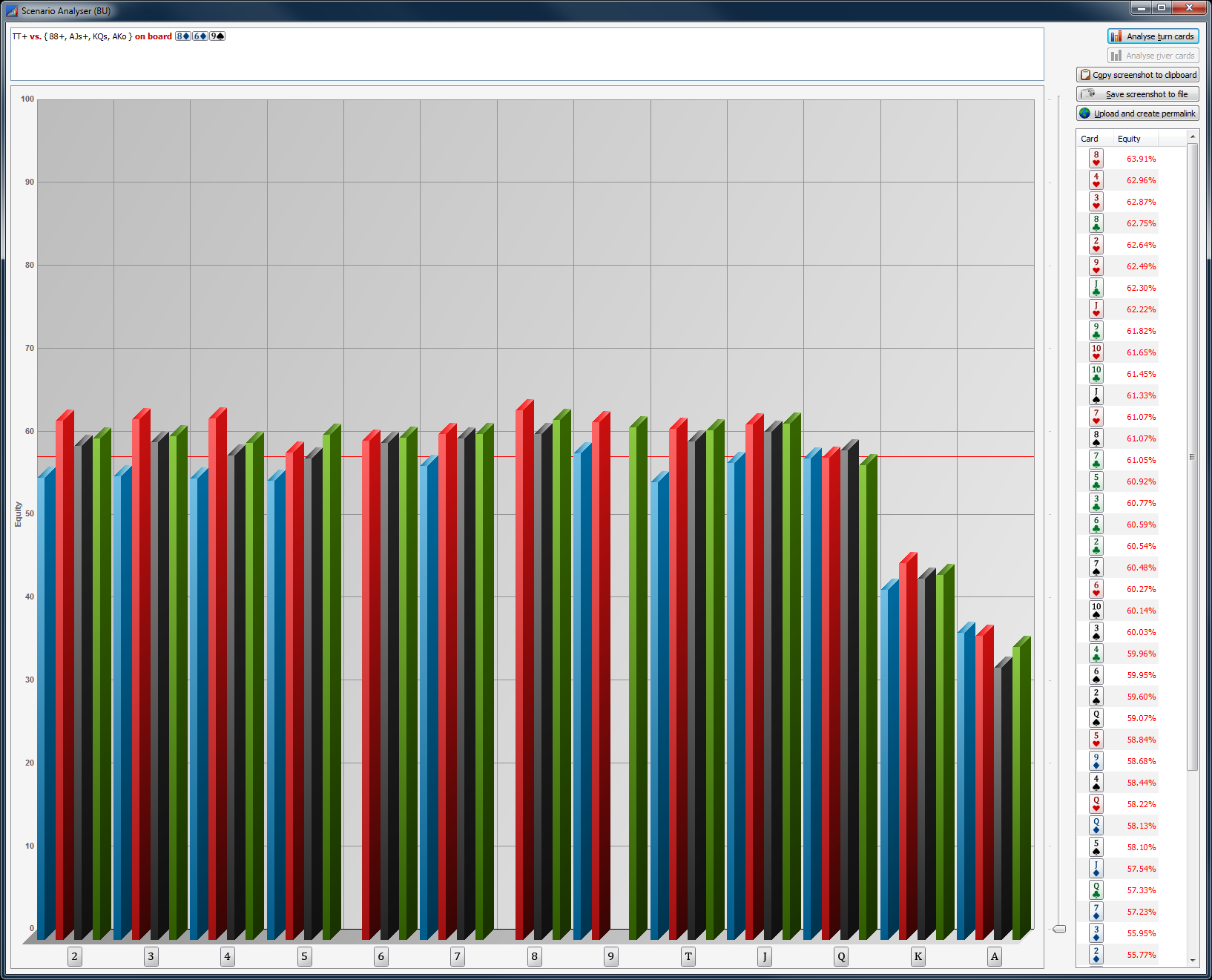
Scenario analyser: Fully resizable window and diagram to support high resolution monitors.

best regards, nopi


Reply
Quote
theEnot
Joined: 27.09.2011

GJ. :f_drink:


Reply
Quote

Originally posted by nopi

Originally posted by TowerHill

Hi TowerHill,

please check out the newest version 1.10.14.0.

best regards, nopi

Great job, thank you. To further improve the UI modality standards of the two windows, The Hand Range from the main window should be locked whenever the Hand Range Selection window is open. I think that would be easier for you to code than to auto-populate any live changes made to the Hand Range in either window.

Originally posted by nopi
good idea ... but, to be honest, if we do that, it will take a while.

Great things are worth waiting for, I hope you decide to develop a mobile app solution someday - I am willing to wait!


Reply
Quote
twinskat
Joined: 10.04.2012

I attempted to download the Power equilab but it just shows the executable file being stored on my drive, then when I click it, it seems to go through the motions of opening the program, but there is no program on my computer. I thought it might be becuase I had already tried the free trial.

So i bought the full version, but again it seems to download correctly. I have tried both the regular power equilab installer, and somehow another 1.10.12.0 exe installer, but both say the program is installed, but when i look, it is not on my computer?

I tried searching files for power equilab, but not there

twinskat


Reply
Quote
nopi
Joined: 18.08.2006

Originally posted by twinskat
I attempted to download the Power equilab but it just shows the executable file being stored on my drive, then when I click it, it seems to go through the motions of opening the program, but there is no program on my computer. I thought it might be becuase I had already tried the free trial.

So i bought the full version, but again it seems to download correctly. I have tried both the regular power equilab installer, and somehow another 1.10.12.0 exe installer, but both say the program is installed, but when i look, it is not on my computer?

I tried searching files for power equilab, but not there

twinskat

Hi twinskat,

the Power-Equilab will be installed in this directory: "c:\Program Files (x86)\Power-Equilab"
... and there should appear an icon on your desktop.

Which Windows version do you have?

best regards, nopi

Reply
Quote

Nopi:

I want to copy my grouping color themes to a different computer, where are the color themes stored?


Reply
Quote
nopi
Joined: 18.08.2006

Originally posted by TowerHill
Nopi:

I want to copy my grouping color themes to a different computer, where are the color themes stored?

All setting files are located here:
c:\Users\<name>\AppData\Local\Equilab\*.ini
or on a german windows:
c:\Dokumente und Einstellungen\<name>\Lokale Einstellungen\Anwendungsdaten\Equilab\*.ini

Alternatively you can export/import the ranges as well.

best regards, nopi


Reply
Quote

I found a bug in the current release. The image server URL permalink contains spaces, the URL that is pasted to the clipboard cannot be resolved.


Reply
Quote
nopi
Joined: 18.08.2006

Originally posted by TowerHill
I found a bug in the current release. The image server URL permalink contains spaces, the URL that is pasted to the clipboard cannot be resolved.

It doesn't matter, does it?
At what point does it makes problems?

best regards, nopi


Reply
Quote

Originally posted by nopi

Originally posted by TowerHill
I found a bug in the current release. The image server URL permalink contains spaces, the URL that is pasted to the clipboard cannot be resolved.

It doesn't matter, does it?
At what point does it makes problems?

best regards, nopi

The space character is reserved as a control character in ASCII, it has to be escaped to be resolved correctly. The URL encoding of a space character is

 %20

if the space character is not encoded then the URL will not resolve. I discovered this bug when I pasted the broken URL into a Facebook post, the space character broke the automatic link that normally occurs in Facebook. The problem existed in 1.10.15, but you already solved the problem in the 1.10.16 release which you just put out. Thanks!


Reply
Quote