


Save 10% on Hand2Note with PokerStrategy.com
Hand2Note is an innovative tracking software with a massive range of unique features, including an advanced note taking system you won't find anywhere else.

Hand2Note in a nutshell
- Innovative tracking software with a highly dynamic fully customisable HUD, extensive results reports, and intuitive statistical pop-ups.
- Low hardware requirements that still ensure a high speed of hand processing, comprehensive calculations, and data flow.
- Unique easy to use features like the ability to insert visualised hands into notes and pinning notes to stats right at the table.
- Free to use BASE version that can be expanded with the EDGE add-on providing many more features for ambitious poker players.
Save 10% on Hand2Note with PokerStrategy.com
10% discount on Hand2Note
Use our special discount code H2N10JSJPS and you'll receive a discount of 10% on your first purchase of Hand2Note as a PokerStrategy.com player.
Hand2Note is available in two different offers:
| BASE Version |
EDGE Add-on |
|---|---|
| âœ”ï¸ Static HUD | âœ”ï¸ Static HUD |
| âœ”ï¸ General Reports & Session Reports | âœ”ï¸ General Reports & Session Reports |
| âœ”ï¸ Custom Stats | âœ”ï¸ Custom Stats |
| âœ”ï¸ Regular Updates & 24/7 Support | âœ”ï¸ Regular Updates & 24/7 Support |
| âœ”ï¸ All Stakes & Limits | âœ”ï¸ All Stakes & Limits |
| ⌠Dynamic HUD | âœ”ï¸ Dynamic HUD |
| ⌠Decision EV Analysis | âœ”ï¸ Decision EV Analysis |
| ⌠Advanced Stats | âœ”ï¸ Advanced Stats |
| ⌠Range Research | âœ”ï¸ Range Research |
| FREE TO USE | $19.99/Month* |
| *Paid yearly. Save 10% with the discount code H2N10JSJPS. | |
Furthermore, there's also an ASIA version of Hand2Note available that includes support for a dozen Asia-focused rooms, including mobile-only operators like our very own partner room KKPoker.
To get the 10% PokerStrategy.com discount on your first purchase of Hand2Note, simply use our code H2N10JSJPS in the checkout process.
What is Hand2Note?
 Hand2Note provides online poker players with statistics, poker analytical tools and data visualization, containing a full set of tools for playing poker seriously and competitively.
From HUDs, popups including visual presentation of preflop and postflop ranges, reports, graphs, analysis and much more. The software includes everything you may expect from typical poker tracking software, along with a lot of innovative and powerful features required by a professional poker player.
Hand2Note HUD

One of the central features, the Hand2Note HUD, offers three types of typical Heads-up Displays used by serious players:
- Static HUD shows the same stats for all players at the table. You probably used this kind of HUD in other software.
- Positional HUD shows different stats for different players at the table depending on their positions, hero's position, stack sizes, number of players in the hand and many other criteria known at the beginning of the hand.
- Dynamic HUD shows stats depending on players' actions in a hand. For example, it may show the stat OPEN RAISE MP only when a player open raises from middle position.
Note: The Positional and Dynamic HUD are prohibited at PokerStars but allowed at a variety of other poker rooms.
Advanced Notes with Hand2Note
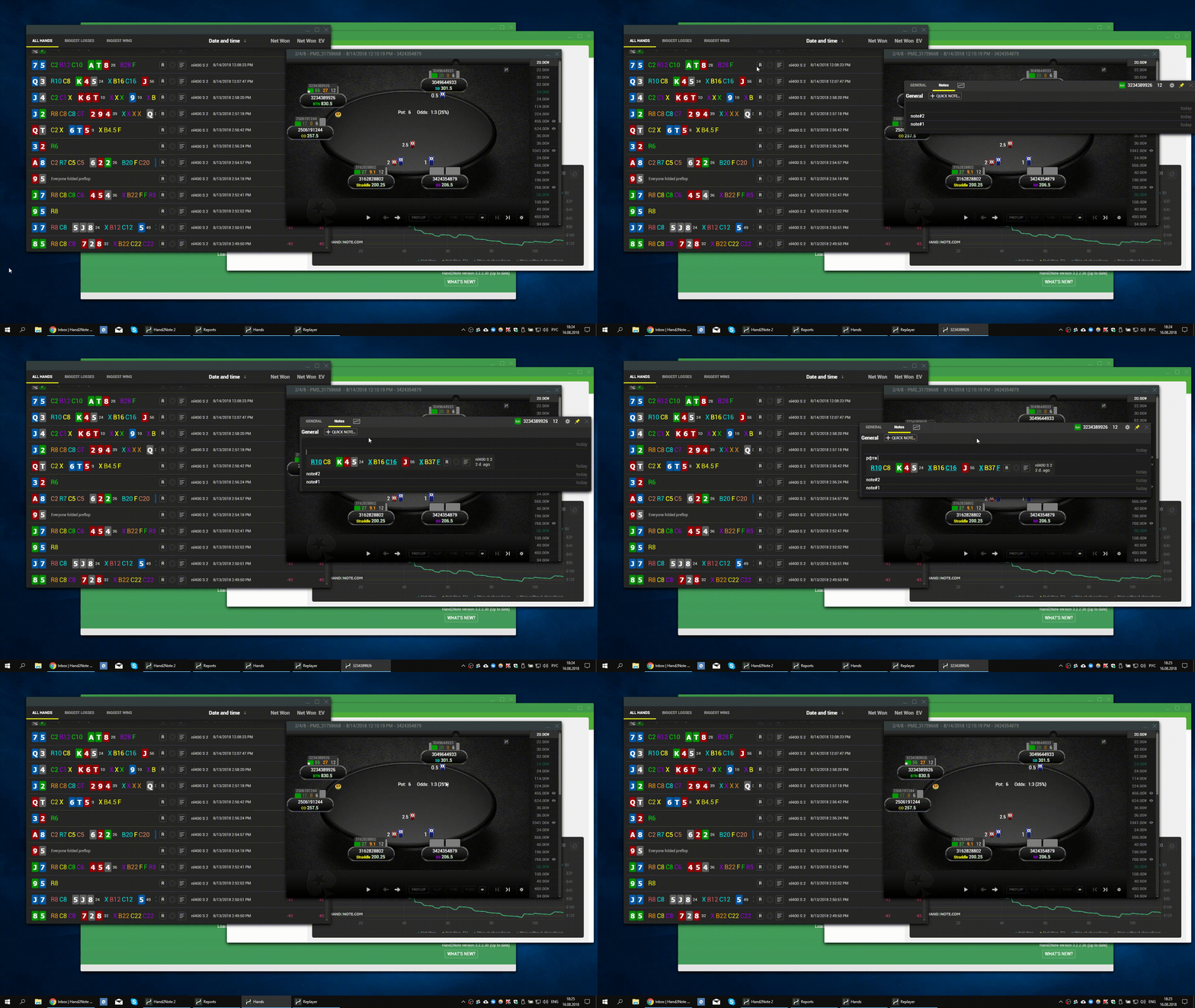
Furthermore, Hand2Note provides the most advanced note taking system among any poker software. It is designed to solve the following problems faced by almost every player throughout a session at the tables:
- Notes become unreadable if you have too many on a single player. As a consequence, there is not enough time to find and read a required note during a game.
- There is not enough time to write down a note if you play many tables.
- It is often necessary to write down a hand into a note, but it takes a lot of time and the result is often unreadable.
All these issues are no longer relevant with Hand2Note since you can create templates for notes in advance, insert fully visualised hands into notes, and also write down notes separately and individually for each stat, providing the most efficient note taking system out there.
Quick Hand View
During a poker session we often have to review opponents hands in a replayer, taking a considerable amount of time. This problem is especially relevant for multi-tabling. You need to focus on the replayer for at least a few seconds, at which time you most often lose sight of the action at the tables, making bad decisions and spending precious timebanks.
In Hand2Note, a unique compact hand visualisation format is used, which allows you to read the entire hand in literally a second.

At the same time, a replayer and a standard hand history view are also available, which you can use if necessary. However, compact visualization is without a doubt of unmeasurable value during a poker session, and Hand2Note is making sure you're getting exactly that!
The Showdowns Indicator
Most often we rely on stats in HUD and popups when analyzing opponents in multi-tabling sessions. However, in most cases stats don't have enough sample and are highly susceptible to dispersion.
Obviously, the most useful information about an opponent with insufficient sample size can be obtained from his showdowns. Having seen several hands with open cards allows us to make more accurate assumptions about his game compared to studying his entire popup of stats with small samples.
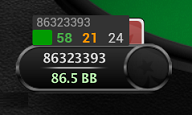
Hand2Note allows you to always be aware of all the showdowns of all players at the table and quickly review these hands in realtime.
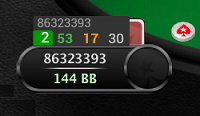
Once you sit at the table, a HUD for all the opponents will be displayed. This HUD includes stats and a color note icon for a player by default. After each hand in which a player's cards were revealed, the counter on that icon will increase. For example, if your opponent showed his cards two times since you sat down at the table, you'll see the number "2" on top of the color mark.
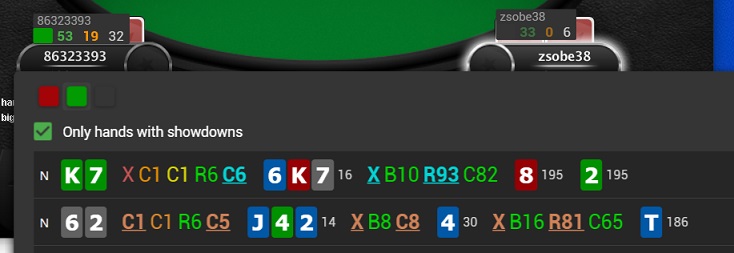
Now you can hover over the icon, quickly review these two hands and draw your conclusions. Afterwards, the counter will be reset. Subsequently, it will be increased again when the player shows another hand at the showdown. Thus, you can keep abreast of all the open cards of your opponents by simply hovering over their color marks whenever new showdowns are indicated.
Automatic Reg-vs-Fish Recognition
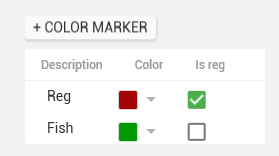
A large number of functions in Hand2Note are based on separation of all opponents into two groups: regulars and fish. Hand2Note identifies who is a regular in accordance with the "Who is reg" settings that you can manually adjust for each game format.
You can also assign a color marker to a player that will define him as a regular or fish. By default, the green marker is used to indicate a fish and red marker for a regular, making this another very powerful feature for your day-to-day at the tables.
Decision Analysis
Decision Analysis is another set of features in Hand2Note intended to analyse the effectiveness of your own and other players decisions in different spots.
Note: Decision Analysis is available only with EDGE or PRO subscription.
Currently it includes the following features: Action Profit, Spot Frequency, and Next Villains Actions.
Action Profit shows how profitable your decisions are in each spot:
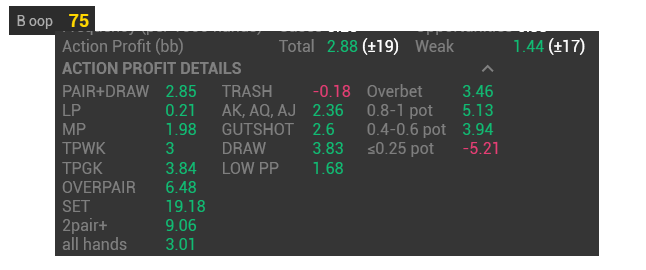
If Action Profit is greater than zero on a specific stat then your actions are profitable (but not necessary optimal, because other available actions could give you more profit). If Action Profit is negative, then this action is -EV for you and you should consider folding if these situations reoccur.
Spot frequency shows how often a specific spot occurs:

This is Spot Frequency on the stat CBET FLOP OOP, with the player c-betting 5.34 times per 1,000 hands while actually having an opportunity to make a continuation bet 6.45 times per 1,000 hands. In summary, Cases show how often the action was actually performed and Opportunities show how often it could have been performed.
Next Villian's Actions shows how opponents react to a player actions:

On the image above you may see that an opponent folded in 42% of cases, called 45% and raised 13% against your check-raise, with BX standing for the line Bet/Check, allowing for deep dives into opponent's preferred lines against your actions. For example, the stat 4BET IP in Next Villain's Actions will show how often your opponents Donk/Check when calling your 4-Bet out of position.
Many more Features
These are just some of the features available in Hand2Note. If you want to know what else is offered or take a deeper dive into the ones presented, take a look at the extensive Hand2Note guide on each feature on the Hand2Note website.
If you're having problems with Hand2Note—using the software, installation difficulties, or if you just want some hints and tricks on how to get the most out of it—please visit visit the official Hand2Note support thread in our English forum or check out the entire board:
