Skip to forum
Notifications
Clear all

Streaming Demands on a Computer

8 Posts
5 Users
0 Reactions
3,039 Views
Super Moderator
VorpalF2F
Joined: 02.09.2010

I've recently been streaming poker -- 4 to 5 hours at a time.
When I first started, my graphics system was the on-board video.

While streaming, and playing several tables, the GPU would be running at 100%, the CPU likewise, and temperatures would get so high the computer would shut down.

I recently purchased a used MSI GTX 960 graphics card and after a few days messing about, it is now installed and working.

What an education.
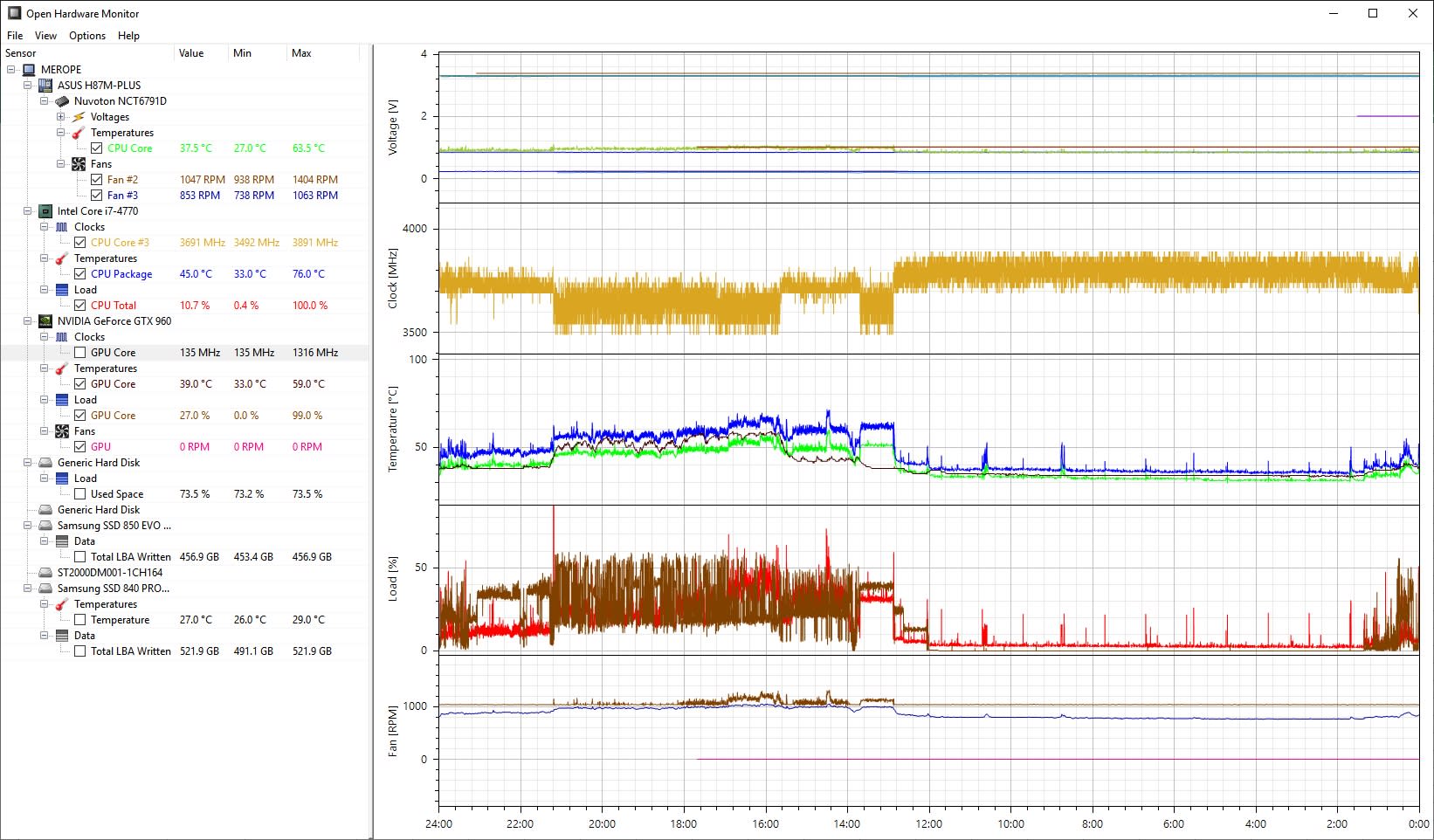
:diamond:  At the 15 hour mark I sit down, do a few emails etc.
:diamond:  I start streaming at the 12-hour mark. As the temperature rises to near 80C, you can see that the clock trace goes flat -- this is the Intel i7 processor's "thermal throttling" -- it slows itself down to prevent overheating and damage. You can see that the CPU load (orange) never reaches 100%, and the GPU load (brown) ticks along at about 40 -- with a few spikes. The fan speeds do what is expected. What was NOT expected was the GPU fans not coming on at all until the GPU reached 60C.

Ambient temperature seems important. Look at the slow fall in temperature from the left-hand edge to the point where I start to use the computer.

Here is the graph that the notes refer to:

Reply
Quote
7 replies
la55i
Joined: 27.01.2013

Nice :f_drink:
What kind of a computer do you have there? Since you are changing some parts, have you considered changing some fans and/or CPU cooler too? I have understood that where you place your fans and to which direction they push the air makes a difference. You could google pc fan setup or optimal airflow or something like that and get some ideas.


Reply
Quote
Super Moderator
VorpalF2F
Joined: 02.09.2010

It's a standard desktop.
Intel i7-4770 with 16 GB RAM. There is a 2TB fixed disk, and 2 256MB SSDs.
One SSD is the system, and the other hosts my MySQL and PostgreSQL databases.

I could indeed get a CPU cooler with a higher thermal capacity, but the one I have is reasonably good.

I'll run as is unless I encounter difficulties down the road.
I hate changing too many things at once.

There are also active cooling systems that use water -- but the thought of water near all my electronics scares me not a little.

Cheers,
VS


Reply
Quote

Usually, it works better if you lower either your main video rendering settings or streaming settings. But if you have a decent graphics card and relatively new CPU you're fine.


Reply
Quote
deralte71
Joined: 09.08.2010

Don’t know anything about computers but subbed yr stream🤗


Reply
Quote
Super Moderator
VorpalF2F
Joined: 02.09.2010

Originally posted by erichol
Usually, it works better if you lower either your main video rendering settings or streaming settings. But if you have a decent graphics card and relatively new CPU you're fine.

After I posted this, I got a graphics card that was high-end at the time my computer was new.
It is an NVidia GeForce GTX 960.

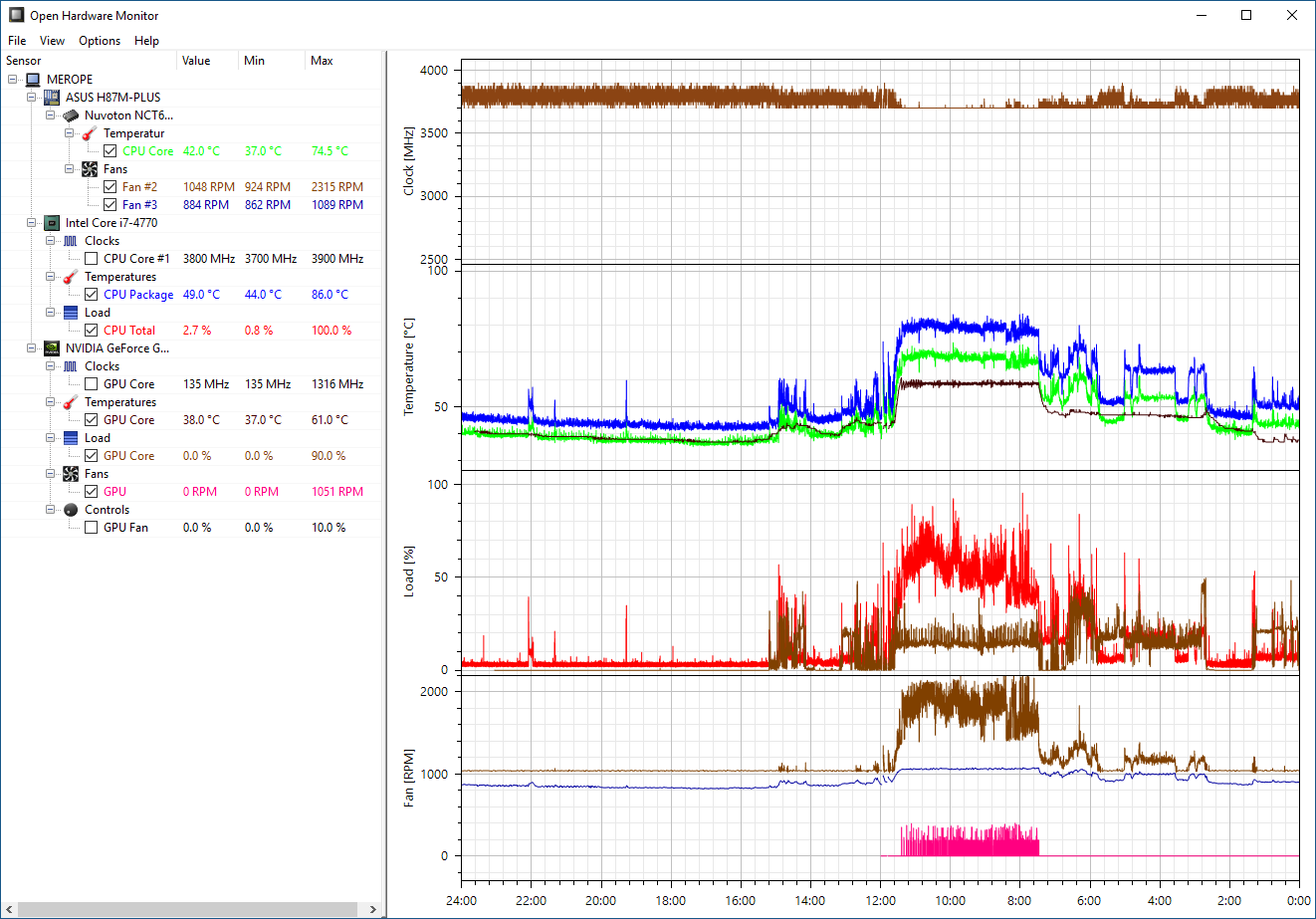
The difference was dramatic -- and I thought I posted the graph previously, but it appears I did not.
This graph shows the previous 24 hours.
Several things to note:
:diamond:  Ambient temperature is about 18C -- things may be different when it gets to 30C
:diamond:  CPU clock shows full variation
:diamond:  CPU Temp barely hits 70C
:diamond:  CPU Load / GPU load even while streaming is only around 60% -- it would hit 100% quite frequently previously

The other big plus is that my "Dropped frames due to rendering lag" has dropped to near 0
I stream with my 1920x1080 canvas resolution downscaled to 1280x720 both before and after the Graphics card installation.


Reply
Quote
Super Moderator
VorpalF2F
Joined: 02.09.2010

Originally posted by deralte71
Don’t know anything about computers but subbed yr stream🤗

Thanks!
If you haven't watched the stream yet, we'll be live in about 2.5 hours.
Forget the poker, the best thing about the stream is the hatchling eagles...

Cheers,
VS


Reply
Quote
NutshellD
Joined: 29.05.2018

Interesting information :f_drink:


Reply
Quote