Skip to forum
equilab exporting r...
 
Notifications
Clear all

equilab exporting ranges

5 Posts
4 Users
2 Reactions
10.6 K Views
Coach
LemOn36
Joined: 07.02.2009

Can you please add "export/import saved ranges" feature?
I spent loads of hours saving and working on my preflop ranges and would loveto beable to export them/import other people's without manually typing them in.

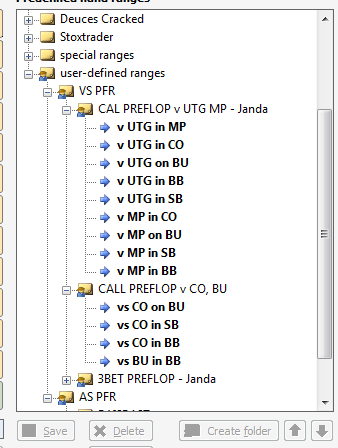
E.g. When I select a folder or multiple ranges I created here:

And there'd be a button "export ranges" I could send the file to another person with equilab and they could just import them, adding a folder in their own equilab with the imported ranges.

It would help your coaches like in this thread:
w34z3l's 6max walkthrough - (microstakes edition)

Thanks guys,

Lemon


Reply
Quote
4 replies
UPAY4DINNER
Joined: 28.09.2009

Hey Lem0n36,

Please accept my deepest apologies for missing this post until now. It is very rare that this happens and I would like to personally apologize for this :(

I will forward this to our IT team immediately. I cannot comment on whether this can be implemented or not because I would have no idea on it's possibility

Thanks for your post and have a great weekend,
Gary.


Reply
Quote
Super Moderator
VorpalF2F
Joined: 02.09.2010

It is possible to share Equilab ranges between players.

To do so involves editing a file.

If this is in your comfort zone, add me in the community tool, and I can explain it.

--VS


Reply
Quote
helliaspapas
Joined: 07.03.2009

Well if it is possible to modify equilab to export ranges it would be nice to have a public walkthrough on how to make this modification(if the creators of the program agree)


Reply
Quote
Super Moderator
VorpalF2F
Joined: 02.09.2010

Hi, helliaspapas...
No modification necessary.

The file that holds the user-defined ranges is called:  PreflopUserdefined.ini

The simplest way to find its exact location is to open an explorer window ("My Computer") and in the address bar type:
%localappdata%\equilab
I presume that this will work with Windows 8 as well as Windows 7

If you still have XP, it is the same, but without the word "local".

You will need to have the option to view hidden and system files turned on.

Once you have located the file, open it in a plain text editor.
Notepad will work.
Wordpad or any editor that provides formatting will mess things up.

Once you have created the ranges you want to give to someone, they will be in the file.
If the someone copies your file into the same folder on their computer, then they have all the ranges.

The problems come in when they also have ranges they want to keep.
Then it will be necessary to edit the file(s) to merge them.

I have no idea what happens if both files have a range of the same name, or a subfolder name that is the same. If that is the case, I suggest just edit one of them.

So...
Create several user-defined ranges at several levels.
Examine the file, and you will know everything I do about its structure.

Have fun!
--VS


Reply
Quote
Share: