


Introducing New Software: The PokerStrategy.com Equilab
Today we are happy to announce that we have added a new software for you to enjoy: the PokerStrategy.com Equilab, the leading equity analysis software on the market. Read on to find out more about this new program that we offer.
What can Equilab do?

When it comes to equity analysis, this software can help you in a variety of ways:
- it helps you calculate your equity in any given situation
- it provides you with potential outcomes postflop thanks to the Scenario Analyser
- you can practice your equity skills with the built-in Equity Trainer
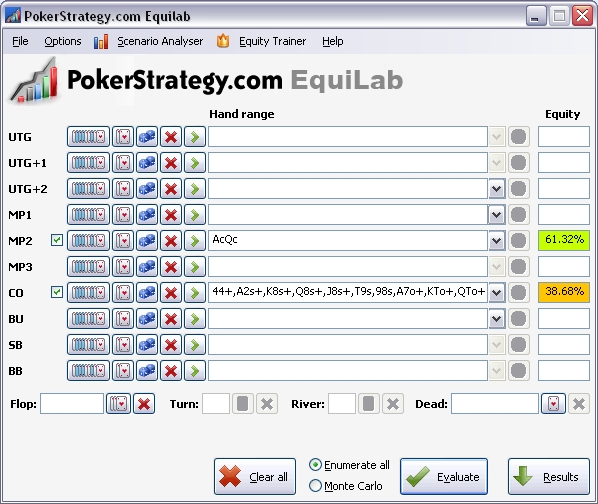
The main window enables you to calculate your equity based on various filters. In order to calculate equity, you must enter the hands or hand ranges of at least two players.
The hand range selection has several features that can help you refine your equity analysis:
- Numerous predefined ranges based on the most common scenarios. You an also customize these ranges or create your own and add them to the database
- The possibility to remove cards, suits or combinations of suits from the equity calculations
- The Hand Strength Distribution tool, which tells you the percentages of getting a particular winning hand combination
Once you have set the filters you want, just click "Evaluate" and the equity percentages will be displayed next to each player's hand. Want to share the results? Simply click on "Copy as text" or "Copy as BB code" and then paste them wherever you want to.
 Download the PokerStrategy.com Equilab now
What do you think about the Equilab?
We want to hear your opinion about our new software, so don't hesitate and send us feedback. Have you tried it yet? Are you going to try it? Share your thoughts in our forum thread below.
What do you think of the PokerStrategy.com Equilab?
About Equilab
The PokerStrategy.com Equilab enables you to calculate your equity against various hands or hand ranges. What is equity? Basically, equity means your chance of winning a pot in a given situation. Equilab will help you with those tough decisions and that will definitely improve your winrate.
 |
 |
| The hand range selection window | The hand strength distribution window |
 |
|
| The Equilab main window | |
Calculate a potential outcome with the Scenario Analyser
The Equilab Scenario Analyser gives you the chance to check your equity postflop. This tool analyses the potential cards that could come on the turn or river and tells you what equity you have then.
Click on "Scenario Analyser" from the Equilab menu and you are ready to go. Next, you can select your hand, your opponent's hand or range and the flop cards. Additionally, you can choose to take into consideration only cards of a particular suit by clicking on their names at the top right side of the graph.
Once you have entered this information, you simply have to click on "Analyse turn cards" and you will be displayed the equity for each of the cards that can come on the turn. If you want to analyse your river equity, simply add a turn card and then click on "Analyse river cards".
Each remaining card in the deck, along with its equity percentage, will be displayed on the right side of the Scenario Analyser.
 |
| The Scenario Analyser main window |
Start practising with the Equity Trainer
The third tool from the PokerStrategy.com Equilab allows you to train yourself and test your equity knowledge. Click on the "Equity Trainer" in the Equilab main menu and you will be able to take one of the predefined quizzes or define the ranges yourself.
Once you're ready to go, click "Start training" and your test will begin. Each time there is a question, you will be asked to enter the estimated equity based on your hands, your opponent's range and the cards on the flop.
As soon as you've entered the equity, you can compare it with the result by clicking on the "Answer" button below your entry.
Whenever you want to stop, you can click on "Final results" at the bottom and you will have an overview of how you performed, along with quiz statistics such as the biggest or smallest differences in terms of equity percentage.
 |
 |
| Getting started | The results window |
