New IP Flag: Access Your Country's PokerStrategy.com Content Across the Globe
Your country of residence and IP address have now been determined using your registration details. This means that wherever you go in the world, you will still be able to access the content available in your home country.
What's new?
Once logged in, at the top right hand side of your screen you will see a new Country IP feature with a flag. It will look similar to this:
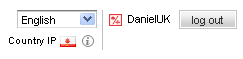 |
Your Country IP has now been determined by the country you were in when you signed up to PokerStrategy.com.
How does my Country IP affect the content I can see?
There are varying legal restrictions in relation to online poker in every country. In order to adhere to the legal situation in each country and to only show content relevant to you, content is filtered according to your Country IP.
There are certain situations where this is especially valuable. For example, French users who live in France use .fr poker rooms. Some French speaking users outside of France – in Canada and Belgium for example- use .com rooms. Having a specific Country IP helps us direct them to the appropriate content and avoid confusion whilst also following legal guidelines.
How has this improved my access when travelling?
Now you can access all the same PokerStrategy.com content wherever you are in the world. Your Country IP is now fixed and you can access all the same content you can at home regardless of whether you are in the North Pole or Timbuktu.
Can I change my IP address?
You can also temporarily change your IP when in a different country. When abroad, you will see an update button to the left of the Country IP feature. Once changed, this will allow you to access the content available in that country.
You will not be able to change your IP again until you leave that country.
For more information on this new PokerStrategy.com feature, please visit our geo-targeting page.