


Jim Varnon on Hold'em Manager 2's Best Features
In this guest column by Hold'em Manager 2 CEO Jim Varnon, Jim explores six of HM2's best features. PokerStrategists can purchase HM2 for $25 through April 15th.

In the following guest column by Hold'em Manager 2 (HM2) CEO Jim Varnon, Jim dives into several of HM2's features that he believes players have been the most excited about:
In addition to hundreds of new stats (between the reports and HUD) and dozens of new and powerful hand filters, there are several exclusive features and tools that are only available in HM2.
Street-By-Street HUD
Players are always seeking ways to get more information on their HUD, but the reality is that there is only so much room to display information.
We solved this by allowing the customer to display a different HUD at each stage of the hand. For example, all of your HUD stats that apply to pre-flop play disappear when the flop occurs, and they are replaced by stats that you want displayed only on the flop.
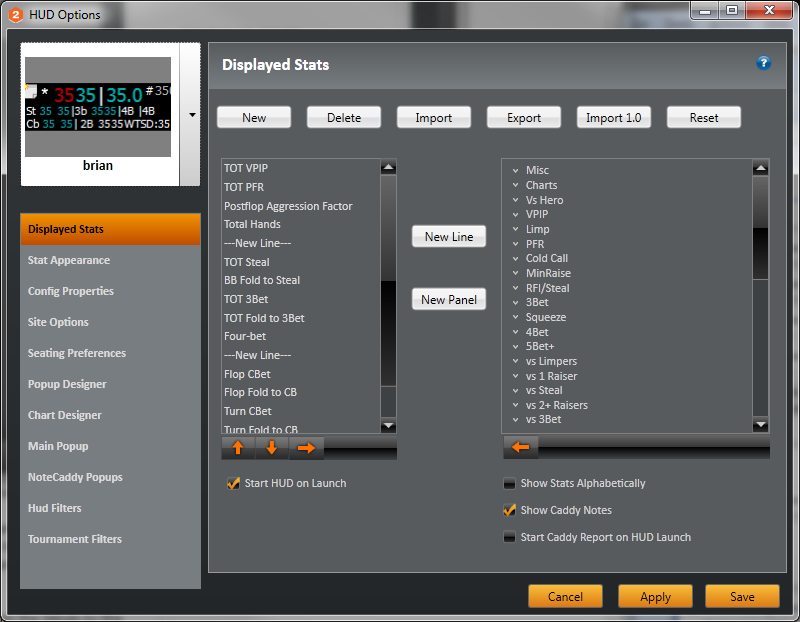 |
| HM2's HUD Menu |
"vs. Hero" Stats:
HM2 provides stats on how an opponent plays in hands that you were involved in, as opposed to the opponent's overall stats against all opponents.
For opponents that you have played a large number of hands against, these stats are quite useful and at times can differ substantially from the profile that you would rely on with competitor software products.
NoteCaddy
We saw this product two years ago and instantly realized what an innovative and valuable tool it was, so we contacted the developer to be part of the HM2 development team.
NoteCaddy creates automated player notes and then presents them in an eloquent way that allows the information to be used effectively and efficiently during playing sessions. NoteCaddy prioritizes the most important notes and it combines them with visual Weak vs Strong scatter charts for the hand histories that triggered the note.
Individual NoteCaddy notes even include a "play" button that opens the HM2 Hand Replayer and replays the specific hands that triggered the note.
Take a look at this example of a NoteCaddy note on a situation where a villain is the opening raiser in steal position:

HUD Charts
Some of us process information visually much quicker and more easily than we do tables of numbers. With the release of HM2, players can replace the traditional HUD with a simple and intuitive HUD Chart. You select up to 4 stats that you want in the HUD chart and a small horizontal bar graph displays a villain’s percentile ranking on each of the stats.

Player Line Analysis
Players that are willing to invest some time away from the tables to analyse their own game and the games of their opponents will find the expanded Line Analysis tool in HM2 invaluable and incredibly powerful. It allows you to set-up any number of betting lines taken along with other variables such as board texture and position. Then, it returns all of the matching show-down hands along with a pie chart that that visually breaks down the specific player’s hand strength on the flop or turn.

For sites with the Street-By-Street HUD options, there is even a version of the player line analysis that is integrated into the HUD and updates based on the actual lines being taken by a particular villain.
Hold'em Manager Sync
Prior to HM2, when you played on more than one computer you would inevitably have different partial databases on the two computers, and neither database was complete unless you tediously manually uploaded all hands played while using the other computer.
Additionally, most players forget to backup their database, and if they later have a hardware failure they spend hours re-importing their hands on a new hard drive or computer (if they still have them). With the addition of the new HM Sync feature, all hands played on one computer are automatically uploaded to HM2 servers and then synced with the database on your 2nd computer the next time you play on it.
The HM Sync service also serves as offsite secure storage in case of hardware failure. HM Sync is an optional service that is free for 6 months and then costs only $20 per year. Your hands are not combined in a database with any other player's hands and no other player has access to your HM Sync hands.
By Jim Varnon, Hold'em Manager 2 CEO
