


Poker Planner iPhone App Review
We tested out the latest poker iPhone app called "Poker Planner", which is said to notify you in advance when your favourite online tournaments are about to begin. Read more about this app below.
Poker Planner is a tool devised to help create a smoother way of finding and remembering online poker tournaments while you are on the move. We downloaded a version of Poker Planner, for free, on our iPhone and within minutes there was an icon on our phone.
Filters
 |
| Alerts for all your favourite tournaments |
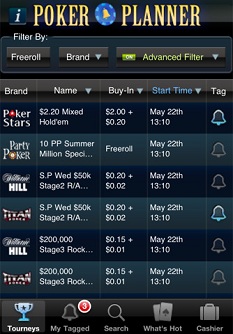
Freeroll: Filters the tournaments so that the freeroll tournaments are shown at the top of your screen.
This button is handy if you want to find freerolls but annoyingly once you have pressed it you cannot deactivate it until you have selected other buttons such as brand type or the advanced filter options.
Brand: This filter allows you to select the online poker room of your choice. At the moment the sites available are Titan Poker, Bodog, PokerStars, PartyPoker, bwin, 888poker and William Hill. You simply select your appropriate poker room and a list of tournaments, buy-ins and start times will appear in the main screen.
Advanced Filter: Here you can customise your Poker Planner by drilling down into poker room, game type, buy-in, game speed and limit type.
Main Screen
The main screen shows you the full list of tournaments available to you once you have adjusted your filters. You have a choice of sorting this data by name, buy-in or start time. If you press an available tournament, a much bigger detail screen pops up on your screen.
This pop up has a countdown clock telling you how much time you have before the tournament starts and all of the detail about that tournament including, title, start time, game type, buy-in, limit type, ID and speed.
Lying horizontal at the bottom of the pop up is a green band called Order Notification. You press this if you want to be notified when this tournament is about to begin.
Once pressed, you have an option of selecting a notification period of 15, 30, 45 or 60 minutes before starting time. As soon as you have ordered your notification, you will have an option to order more or cancel the ones you have already tagged.
Verdict
You don't get anything in life for free and Poker Planner is no different. You may think you are getting a free app but what you are actually getting are 10 free notifications. Once these have expired you need to dip into your pocket in order to purchase more notifications.
Poker Planner is not thorough enough. There are glaring omissions in the data such as mixed game availability and game type (6-max, full ring and heads-up).
The filtering system is easy to use but you are restricted to data provided by a limited number of sites.
But the biggest problem we found was the actual notification alert. There wasn't one! We selected various tournaments, which were tagged and moved to our tagged area, but the tournament start time came and passed without anything happening. No alert. No buzzing phone. No ring tone. Nothing.
Maybe we made a mistake and did not set it up properly? But if we did then is it really that easy to use in the first place?
by Lee Davy
