Skip to forum
[OFFICIAL Support T...
 
Notifications
Clear all

[OFFICIAL Support Thread] Power-Equilab - Equity calculation tool

346 Posts
81 Users
46 Reactions
175.3 K Views
nopi
Joined: 18.08.2006

Hi TowerHill,

please apologize, we are in holidays ... so our answers might be very short.

Originally posted by TowerHill
nopi:

1) I have a range which consists of six grouped subranges. The majority of the time I only need to work with one of the subranges, but occasionally I need to combine two or more of the subranges to determine the equity of the combined ranges vs an opponent. For example My range named UTG RFI might consist of Raise First In from BTN in Group 1, and Raise or Fold in Group 2. There are times when I need to combine the subranges of group 1 and 2, how can that be done?

For now, you have to do it via textual input f.e. in the mainwindow (copy, paste, concat with comma)
You can add ungrouped saved ranges in the handrange window by holding the ctrl-key and click the desired range in the rangetree. This only works for ungrouped ranges. I will think about a proper solution for this.

Originally posted by TowerHill
2) I have noticed that I can type in a new hand range manually in the main window's Hand Range field, but once I have a range defined then components of the hair range will delete itself if I type a comma. Another example, say the range is [22,AQs-A2s,82s,AQo-A2o], if I click to insert the curser after the A2o and click backspace then [,AQo-A2o] is deleted. This appears to be a bug but it may also be a feature that is not working correctly - please advise.

Really strange, seems to be a bug. Will be solved.

Originally posted by TowerHill
3) I double click to select an entire range % field (such as in the Hand Range Selector's VPIP field) and then type in the number I wish to use, the first number is populated correctly, but then the curser jumps to the position after the "%" character and the second digit (or more) of the number is populated in the wrong position. This is clearly a bug.

Yes, this is a bug and will be solved.

Originally posted by TowerHill
4) Are there any keyboard shortcuts?

Almost all buttons should be activated by an hotkey (Alt + character).
Which other shortcuts would you like to have?

Originally posted by TowerHill
5) Can you please provide a great tutorial on how to best use the Grouping system? I primarily use CRev, but I expect to do most of my work in power-equilab going forward because the grouping system appears to be the best way to save my complex ranges. How did you anticipate the grouping system to be used?

Unfortunately, there is no written manual available at the moment.
Maybe we can start a "win-win" collaboration? ... feel free to contact me at Skype (nopi65)

Originally posted by TowerHill
Can we mass edit the names of all groups across all ranges at once or do we have to manually edit the names of each group in each range?

No. Is it really necessarry?

Originally posted by TowerHill
Can we move the subranges from group 12 to group 16 in a given range?

No.
This makes no sense, because the parent ranges are different and subranges only can contains hands of his parent range.

Originally posted by TowerHill
I found another bug. I was following along with Sample 2 found on the features page of your website, I entered in the same exact ranges shown and used [JJ-22,AQs-ATs,KJs+,QTs+,J9s+,T8s+,97s+,87s,76s,65s,AQo,KQo,QJo,JTo] on the Button which is a total of 172 combos. I then clicked the Hand Range Selection button, t Hand Range Selection window now displays the hand range as [JJ-22, KJs, J9s+, T8s+, 97s+, 87s, 76s, 65s, AsQs, AcQc, KdQd, KsQs, KcQc, AhJh, AsJs, AcJc, QdJd, QsJs, QcJc, AhTh, AsTs, AcTc, QdTd, QsTs, QcTc, JTo, AhQd, AhQs, AhQc, AsQd, AsQc, AcQd, AcQs, KdQs, KdQc, KhQd, KhQs, KhQc, KsQd, KsQc, KcQd, KcQs, QdJh, QdJs, QdJc, QsJd, QsJh, QsJc, QcJd, QcJh, QcJs] and is listed as 154 combos. I can reproduce this bug even after restarting the application, if I manually type in the Button range by itself with no other positions filled then the range is populated correctly in the Hand Range Selection window. This bug only occurs when there is more than one position populated with a hand or range.

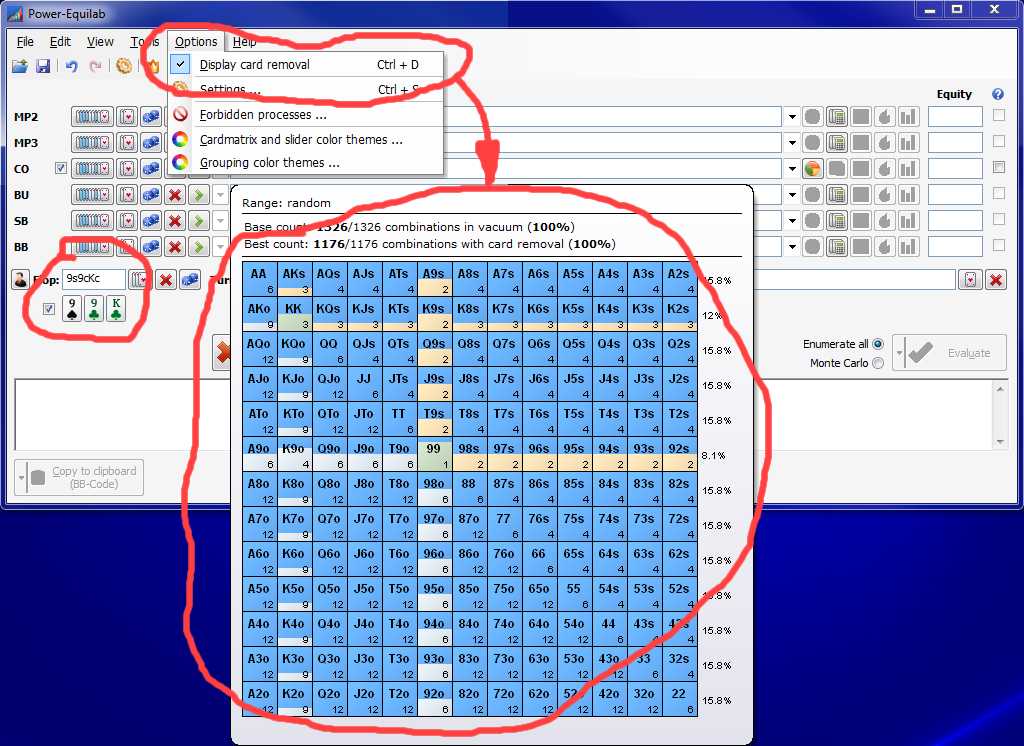
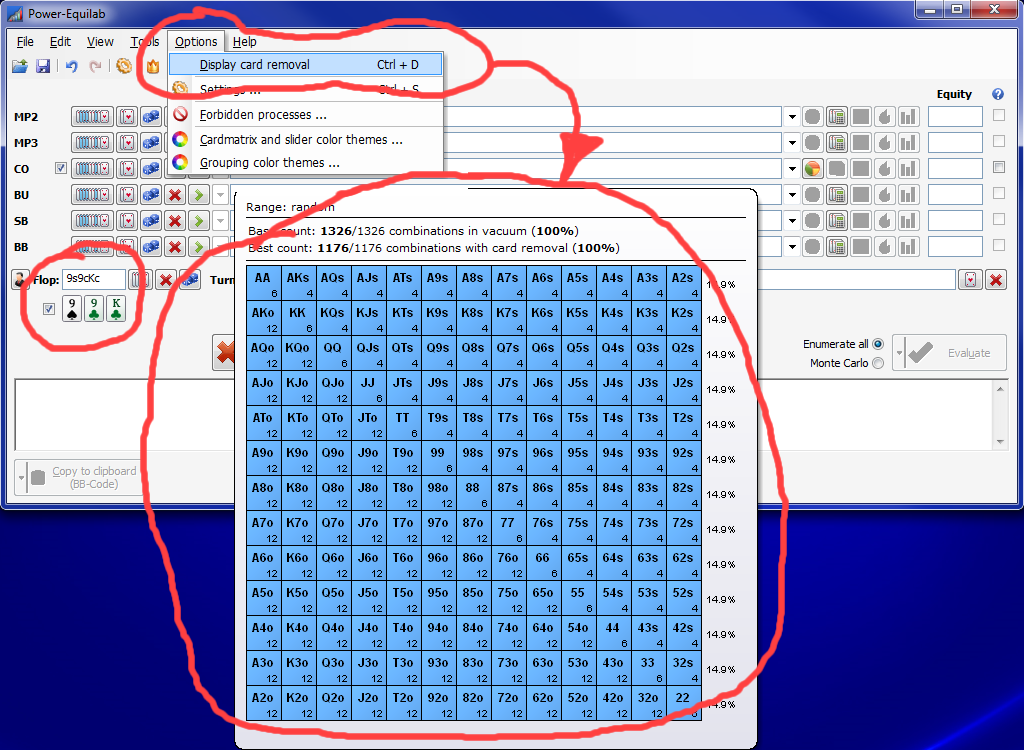
This is because you have activated the "Display card removal"-option (right click on the matrix in the handrane window or via "Options"-button). If this option is activated all given single cards in the mainwindow (players and/or board/dead) will be deleted from the range.

Hope this helps at little, best regards, nopi


Reply
Quote

Another bug: The Show Percentages in Tree function displays correctly when creating a new Predefined Hand Range. But I found a situation where this functionality does not re-calcuate, I think this happens because hand combos deleted from a group are re-assigned to the ungrouped range.

I created a Hand Range consisting of 3 groups: Raise, Fold, and Raise or Fold which has 1326 combos (100% of all possible hands). I saved this range, and restarted. I then deleted the Fold Group (1138 combos - 85.8%) and re-saved the Hand Range. When I did this, the Show Percentages in Tree function continued to display this range as 100% as shown in the screen capture below, when in reality it should read as 188 combos - 14.2%.

The deleted hands from the Fold group is now categorized as [Ungrouped: 1138/1326 hands = 85.82%] in the Grouping Options window, which causes the Show Percentages in Tree function to display the wrong results.

I hope these bug reports are helpful, I really like power-eqilab and intend to purchase it once these major bugs are fixed.


Reply
Quote

nopi - thanks for taking your time away from your vacation to answer my posts!

Originally posted by nopi
For now, you have to do it via textual input f.e. in the mainwindow (copy, paste, concat with comma)
You can add ungrouped saved ranges in the handrange window by holding the ctrl-key and click the desired range in the rangetree. This only works for ungrouped ranges. I will think about a proper solution for this.

Thank you for taking the time to think about a proper solution, this is a priority function that is missing in my day to day analysis. It would be much quicker if there was an automated process instead of copying a sub-range and then concatenate with another range via textual input in the main window. Looking forward to a future solution!

Originally posted by TowerHill
4) Are there any keyboard shortcuts?

Almost all buttons should be activated by an hotkey (Alt + character).
Which other shortcuts would you like to have?

I would like to see a shortcut that flips between the three tabs in the Hand Range Selection window. This is the only part of the UI which I find awkward to use, I am hopeful that over time it will improve as the application becomes more mature - but for the meantime a shortcut to flip between the three tabs would be helpful.

Originally posted by TowerHill
5) Can you please provide a great tutorial on how to best use the Grouping system? I primarily use CRev, but I expect to do most of my work in power-equilab going forward because the grouping system appears to be the best way to save my complex ranges. How did you anticipate the grouping system to be used?

Unfortunately, there is no written manual available at the moment.
Maybe we can start a "win-win" collaboration? ... feel free to contact me at Skype (nopi65)

I'm sorry, but I cannot help with the creation of a manual :-(. There are many great content creators within the poker community, but I am not one of them ;-) I will add you on Skype though - you may find it helpful to see my workflow.

Originally posted by TowerHill
Can we mass edit the names of all groups across all ranges at once or do we have to manually edit the names of each group in each range?

No. Is it really necessarry?

I think it is necessary for the users who have standardized workflows, a system-wide solution with the option to override the system-wide settings would be the best for power users as well as casual users who would find this method easier to understand how to use the grouping system. For example I would define in the system preferences Group 1 to always be Raise, Group 2 is always Call, Group 4 is always Raise or Fold. Let the user define the group name and colors as a preference and this preference becomes the default for all existing and new ranges created unless the range has a flag set that stops this override from occurring.

Your current method of managing Groups is similar to PokerRanger, which I did not like because there was no standard across the application. For the power user I recommend a preference that defines the name and color of each group across the entire application, with the option to override the definition. You almost do this already with Grouping Color Themes, but the Themes do not override the colors for each group once saved in the Predefined Hand Range.

Originally posted by TowerHill
Can we move the subranges from group 12 to group 16 in a given range?

No.
This makes no sense, because the parent ranges are different and subranges only can contains hands of his parent range.

Perhaps this explanation will help. As an example, lets say that I saved a Range with groups 1, 2, and 10 populated with hand combinations. Later on I realize I made a mistake, group 10 should have been saved as group 3. Currently we need to copy the range in group 10, delete group 10, and then add this range to group 3. If there was an automated way to re-assign a range to a new group that would be very helpful.


Reply
Quote

nopi:

In the main Power-Equilab window there is a green > Select Preflop Action button which allows the user to populate the range field with a pre-defined list of ranges depending on position. Can the user alter this pre-defined list? It would be great if there was a position preference flag for User Defined Ranges that would allow the Select Preflop Action button to be populated with user defined ranges for the chosen position. Currently I need to open the Hand Range Selection window, choose my pre-defined range from the list, click ok, then select the sub-group I wish to work with. My suggestion would make me much more efficient when using my pre-defined ranges in Power-Equilab.


Reply
Quote
nopi
Joined: 18.08.2006

Originally posted by TowerHill
nopi:

In the main Power-Equilab window there is a green > Select Preflop Action button which allows the user to populate the range field with a pre-defined list of ranges depending on position. Can the user alter this pre-defined list? It would be great if there was a position preference flag for User Defined Ranges that would allow the Select Preflop Action button to be populated with user defined ranges for the chosen position. Currently I need to open the Hand Range Selection window, choose my pre-defined range from the list, click ok, then select the sub-group I wish to work with. My suggestion would make me much more efficient when using my pre-defined ranges in Power-Equilab.

Hi TowerHill,

for now there is no option to change these ranges.
They are read from the file "c:\Program Files (x86)\Power-Equilab\PreflopShortcuts.ini"
Fell free to change it for your own requirements.

We have listed it on our to-do-list.

best reagrds, nopi


Reply
Quote
pertla125
Joined: 02.08.2012

Hello nopi,

I would like to know if there is any way that I could purchase your software either via Skrill or Pokerstars transfer,as FastSpring has some kind of restrictions on my country,and I am unable to buy your software.


Reply
Quote
nopi
Joined: 18.08.2006

Originally posted by pertla125
Hello nopi,

I would like to know if there is any way that I could purchase your software either via Skrill or Pokerstars transfer,as FastSpring has some kind of restrictions on my country,and I am unable to buy your software.

Hi pertla125,

please contact me via Skype: nopi65

best regards, nopi

Reply
Quote

nopi:

Hope your enjoying your vacation!

Can you please add a preference to allow us to copy the board cards as text instead of html/RTF graphics? I am a Mac user, I run Windows in Parallels, unfortunately anytime I copy ranges that include the board card graphics the graphics can be pasted inside of the Parallels Windows virtual machine, but if I past the board cards in an OS X app the graphics are stripped out. This is a side effect of using Parallels, but you could solve this problem by allowing us to select a preference that displays and copies text board cards instead of graphical board cards.

Is this possible? Thanks for your consideration!


Reply
Quote
nopi
Joined: 18.08.2006

Originally posted by TowerHill
... I copy ranges that include the board card graphics ...

Sorry, we don't understand.
With which option do you "copy ranges that include the board cards" ?

best regards, nopi

Reply
Quote

Originally posted by nopi

Originally posted by TowerHill
... I copy ranges that include the board card graphics ...

Sorry, we don't understand.
With which option do you "copy ranges that include the board cards" ?

best regards, nopi
Example shown below.


Reply
Quote

Does the trial has a limited available functions that only purchase user can use? I just want to know first before I tried using it. If the free trial has all the available functions then this is worth trying out.


Reply
Quote
nopi
Joined: 18.08.2006

Originally posted by Casinodepositors
Does the trial has a limited available functions that only purchase user can use? I just want to know first before I tried using it. If the free trial has all the available functions then this is worth trying out.

The trial offers all functions.
The trial only has a limited time period.
The trial version is active for two weeks, but you can ask for another two weeks, so over all you have four weeks to test it :)

best regards, nopi


Reply
Quote
nopi
Joined: 18.08.2006

Hi guys,

now there is a Skype-Channel for fast support and small questions.
Just search for "Power-Equilab Support" or directly via link to join.

best regards, nopi


Reply
Quote
nopi
Joined: 18.08.2006

Originally posted by TowerHill
Another bug: The Show Percentages in Tree function displays correctly when creating a new Predefined Hand Range. But I found a situation where this functionality does not re-calcuate, I think this happens because hand combos deleted from a group are re-assigned to the ungrouped range.

I created a Hand Range consisting of 3 groups: Raise, Fold, and Raise or Fold which has 1326 combos (100% of all possible hands). I saved this range, and restarted. I then deleted the Fold Group (1138 combos - 85.8%) and re-saved the Hand Range. When I did this, the Show Percentages in Tree function continued to display this range as 100% as shown in the screen capture below, when in reality it should read as 188 combos - 14.2%.

The deleted hands from the Fold group is now categorized as [Ungrouped: 1138/1326 hands = 85.82%] in the Grouping Options window, which causes the Show Percentages in Tree function to display the wrong results.

I hope these bug reports are helpful, I really like power-eqilab and intend to purchase it once these major bugs are fixed.

Hi TowerHill,

the result is correct.
If you delete the subgroup "fold", then the parent group is not affected. The parent group contains still 100% of the hands, no matter which subgroups you have defined.

best regards, nopi


Reply
Quote
nopi
Joined: 18.08.2006

unfortunately our holidays are over :\

... but good news: Version 1.10.0.0 is out now.

[Options / Display card removal] is now located in the menu. Setting will directly affect the tooltip matrix.

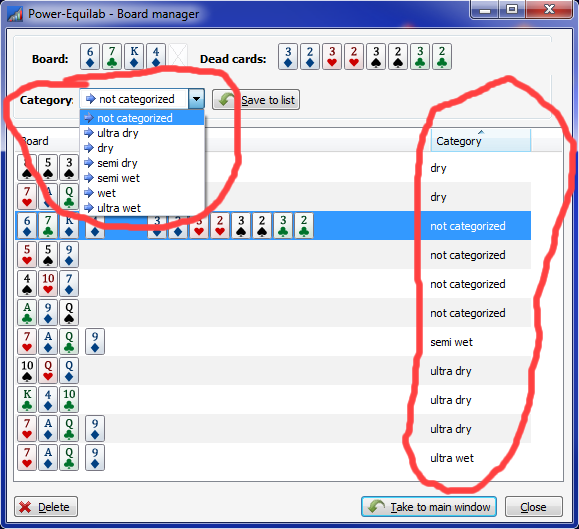
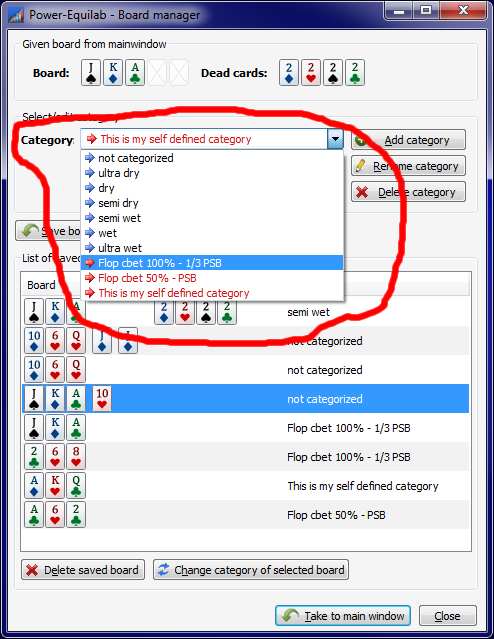
NEW! Board manager to save, restore, fast access, categorize etc. of boards and board structures.

Choose one of the predefined categrories and sort the correspondingly column to have direct acces to similar entires.

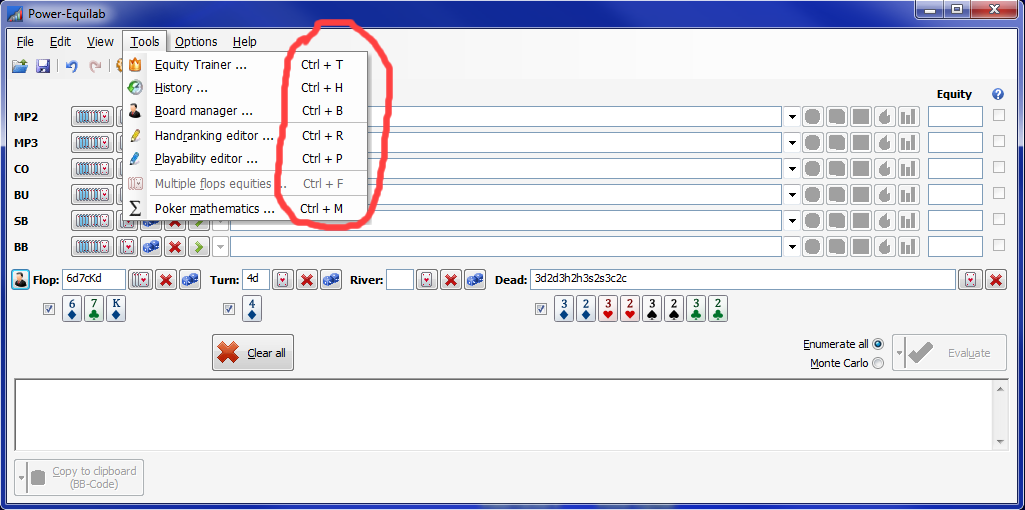
Some accelerators inserted for fast access to all subtools.

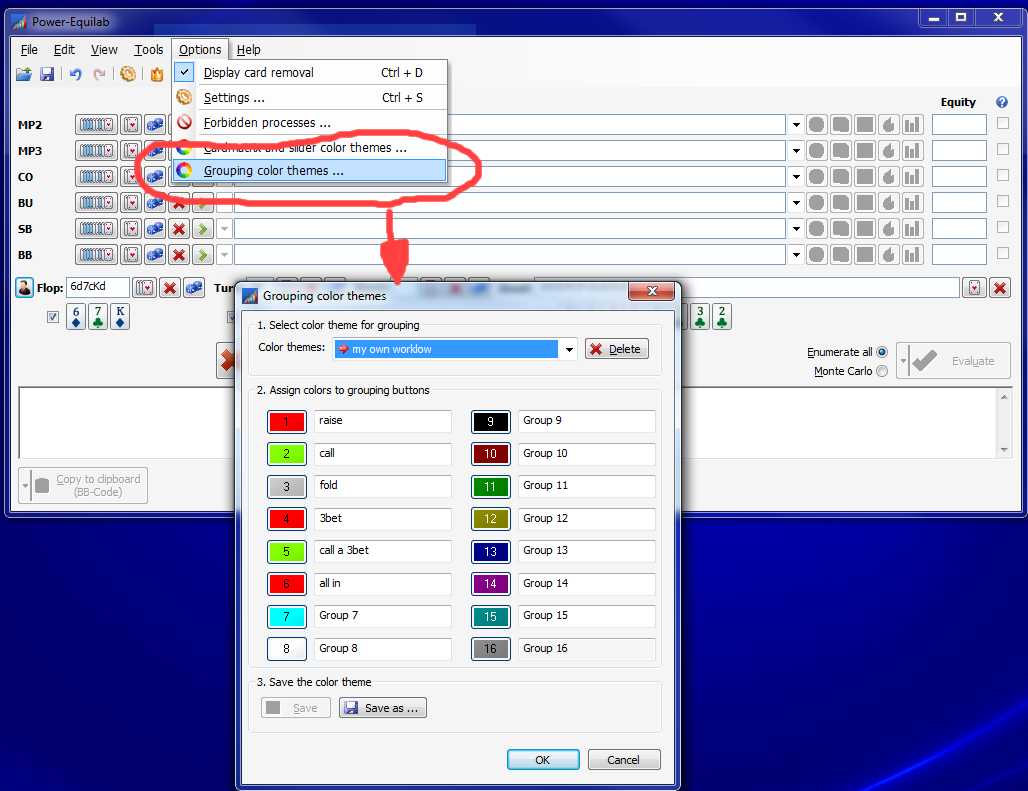
Grouping color themes can be defined with colors and names..

The theme can be assigned to any grouped range for users who like to work with standardized workflows.

best regards, nopi


Reply
Quote
bizousnours
Joined: 16.09.2016

Hello
Is Power Equilab compatible with Windows 10?


Reply
Quote
nopi
Joined: 18.08.2006

Originally posted by bizousnours
Hello
Is Power Equilab compatible with Windows 10?

Yes :)


Reply
Quote
nopi
Joined: 18.08.2006

Version 1.10.3.0 is out now.

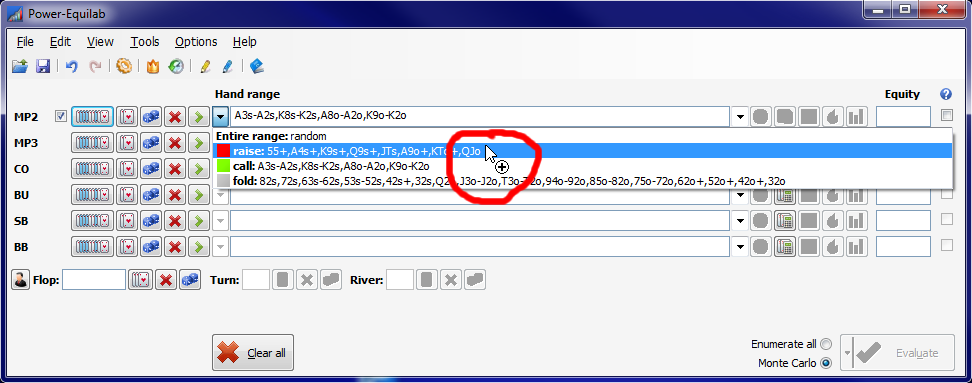
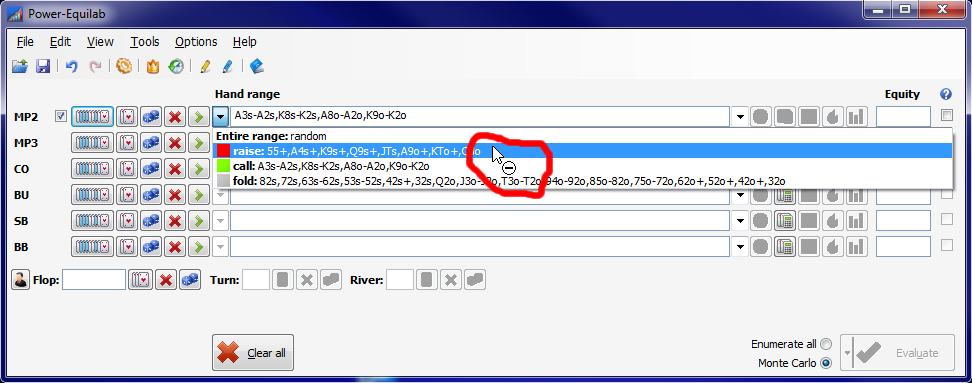
Now, you can add or substract ranges from the comboboxes in the mainwindow.
It can be usefull, f. e. if you like to calculate a raising-range and a calling-range together.
To add a range just press Ctrl while selecting a range in the opened combobox.

To substract a range just press Ctrl+Shift while selecting a range in the opened combobox.

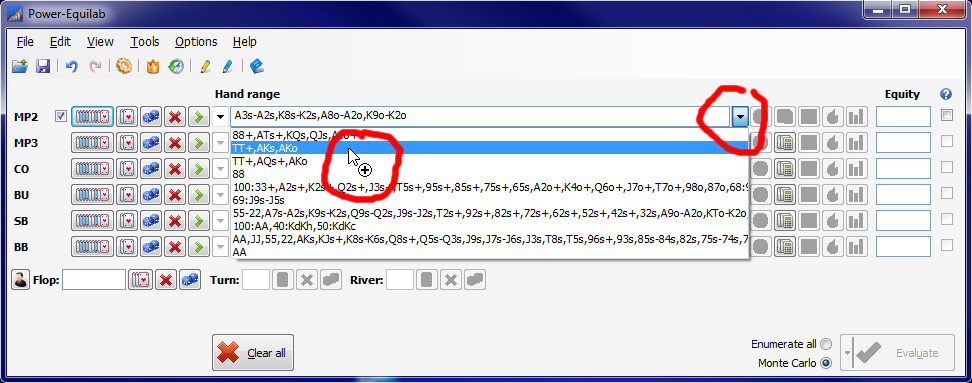
This does not only works with the grouping-comboboxes at the left, this works with the history-comboboxes at the right as well.

best regards, nopi


Reply
Quote
nopi
Joined: 18.08.2006

Version 1.10.6.0 is out now.

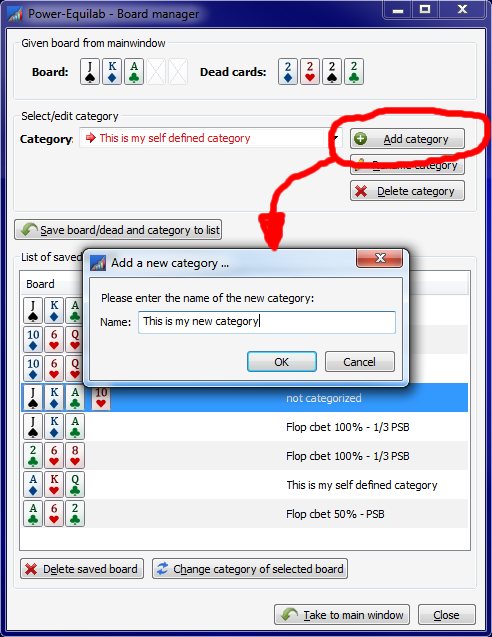
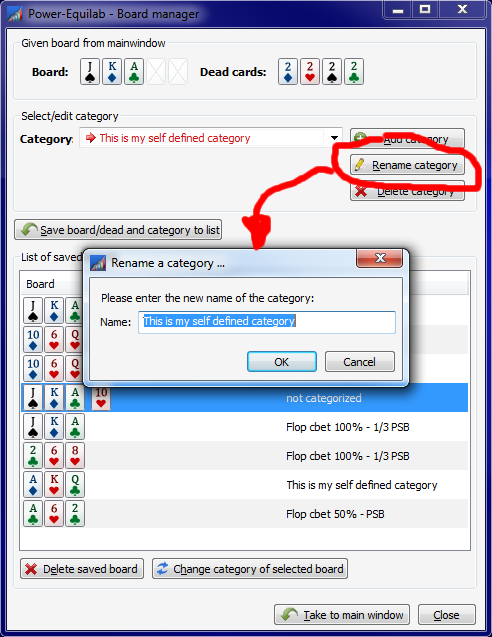
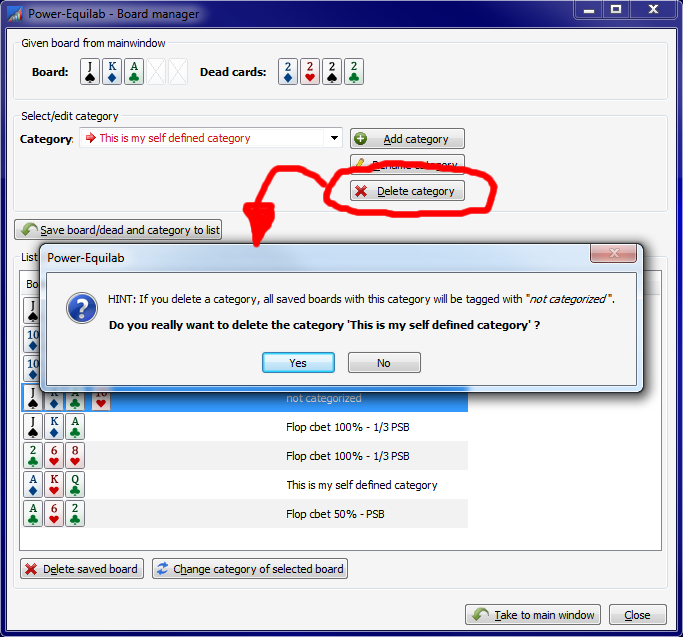
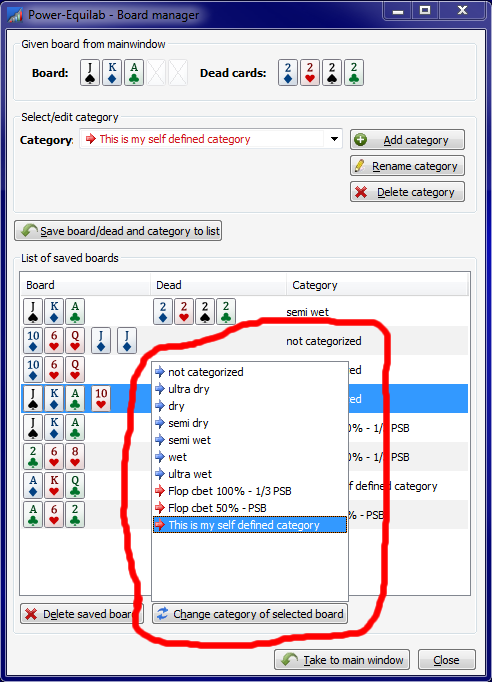
At the request of some users, we have revised the board manager.

You can now add custom board categories:

Just click "Add category" and enter the name of the new category:

Of course you can also rename these categories:

... and delete them:

You can assign another category to a saved board later:

best regards, nopi


Reply
Quote
adasko99
Joined: 13.02.2011

Hello :)

If I'd like to define my own playability profiles, how would I go on about it? What information/statistics/ variables would I need to get it right?
It seems like this feature is for absolute experts only :)


Reply
Quote