Skip to forum
Equilab range selec...
 
Notifications
Clear all

Equilab range selector bug??

8 Posts
3 Users
3 Reactions
3,545 Views
jackaoliver
Joined: 26.04.2014

Hey all,

I'm having a slight problem with Equilab and am not sure why, I have uninstalled and reinstalled but the problem persists.

As you can see in the below image the hand range selector is so small on the page and there appears to be no way to zoom in or out.. this is making it quite difficult to use Equilab for constructing ranges.

Any help on this would be greatly appreciated!


Reply
Quote
7 replies
Super Moderator
VorpalF2F
Joined: 02.09.2010

Hi jackaoliver,
You might have a problem with your display settings -- elsewhere you posted that the PT4 popups are way too large, and here you report that Equilab is showing far too small.

I had a look at Equilab's .ini file, and there is no setting to change the font or size of the display, so whatever is being shown is getting its instructions from elsewhere.

Are these the only two programs that give you sizing problems?

Let us know...
VS


Reply
Quote
jackaoliver
Joined: 26.04.2014

Hey VS,

PT4 settings have been fixed thanks to you, but these are the only 2 programs giving me this problem.

I understand it may be a problem on my end but really unsure of what to do..

Thanks again.


Reply
Quote
Super Moderator
VorpalF2F
Joined: 02.09.2010

Originally posted by jackaoliver
Hey VS,

PT4 settings have been fixed thanks to you, but these are the only 2 programs giving me this problem.

I understand it may be a problem on my end but really unsure of what to do..

Thanks again.

Great to hear that the PT4 suggestion did the trick...

What operating system are you using?
If Windows 10, try this:
right-click on your desktop, and choose "Display"
You will see:
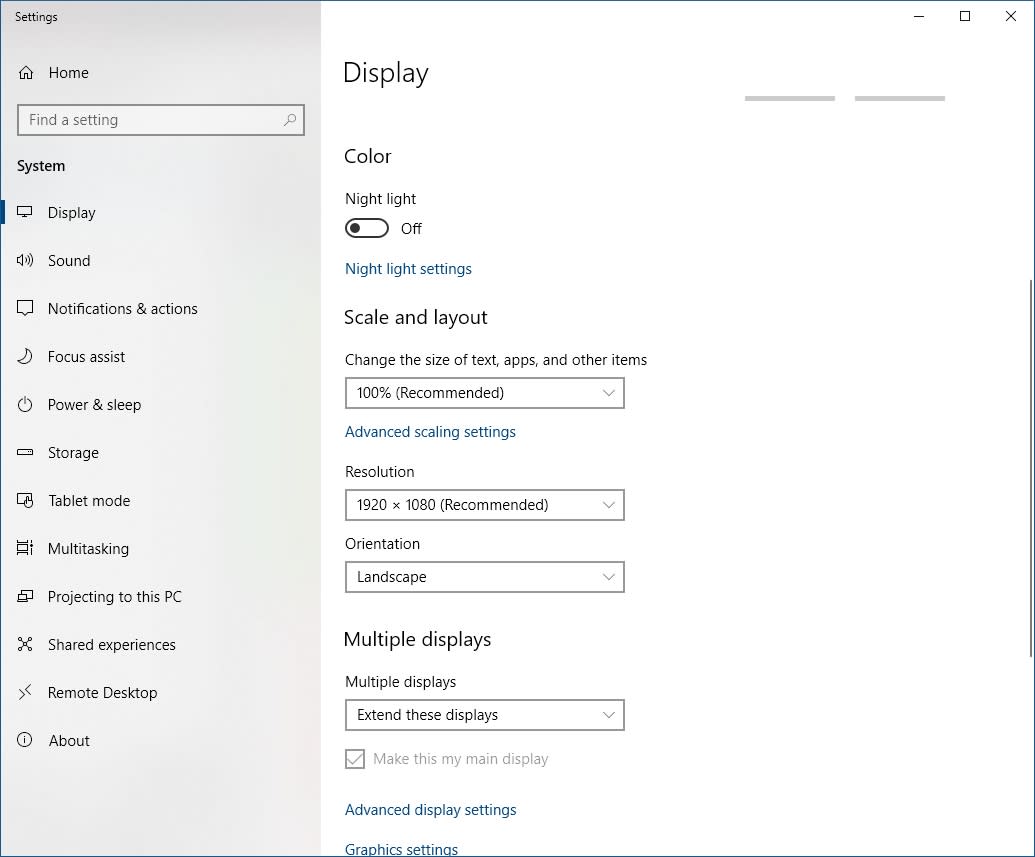
Take notes to record what is in any setting so you can change it back!
Under Scale and Layout click the "advanced scaling settings". In there is an item "Fix Scaling for apps".
Try turning that on.

Next,
Under resolution, use the dropdown to choose the one labelled "recommended" if it isn't there already.
If that doesn't help, go back to whatever resolution you had before.

If none of that helps -- or if you're using a different OS, let us know...

Cheers,
VS


Reply
Quote
Super Moderator
VorpalF2F
Joined: 02.09.2010

I had a look at your Equilab screen shot again.
It is only the card matrix that his strange.

What Equilab version are you using? (Help | About)

Where did you download it from -- and when?

I can't think of any reason why a single element of a program would behave like this...

Peace,
VS


Reply
Quote
la55i
Joined: 27.01.2013

We have had a couple of threads about this problem before. One of them you can find here.
Here is the fix that at least helped someone with this problem:

You need to find the file location for equilab and right click the program.

1- Right click equilab program in file locatio
2. Select restore previous version
3. Properties box will open on screen - click compatibility folder
4. In settings select override high dpi scaling behavior box - in the drop down select 'System".
5. Open Equilab program and check matrix size


Reply
Quote
Super Moderator
VorpalF2F
Joined: 02.09.2010

Nice hand, well played!

wtg La55i!
VS


Reply
Quote
jackaoliver
Joined: 26.04.2014

Ah perfect, worked a treat.

Thanks tremendously La55i for your help. I really appreciate it.

Also thanks to Vorpal for all your help also.


Reply
Quote