


PokerStrategy.com SideKick: New Features
The PokerStrategy.com SideKick awards players with badges, or Kicks, whenever they play online poker and play a significant hand or hit a milestone. Our new feature allows you to see your poker clients and hand history folders at a glance.

The PokerStrategy.com SideKick has been improved with the addition of a new feature and a layout change in the client itself. The new popup displays detected poker clients and hand history folders, while the improved layout contains all important SideKick links.
New feature: Poker client status popup
The PokerStrategy.com SideKick now allows you to easily verify whether or not your poker clients and configurations have been detected. The new poker client status popup appears when you click on the SideKick icon in the Windows system tray. It displays:
• All currently running poker clients
• Detected hand history folders for each poker client. You can click the file path to see where hand histories are imported from by clicking on the poker room icon in the popup window.

New feature: SideKick links
The PokerStrategy.com SideKick window has been updated in order to show you all useful links regarding the SideKick. These now appear in the main SideKick window and will open in a new window or tab in your preferred browser.
The links include:
• The SideKick download guide
• The SideKick overview forum thread
• The SideKick UserVoice improvement suggestions
• The PokerStrategy.com Points Shop
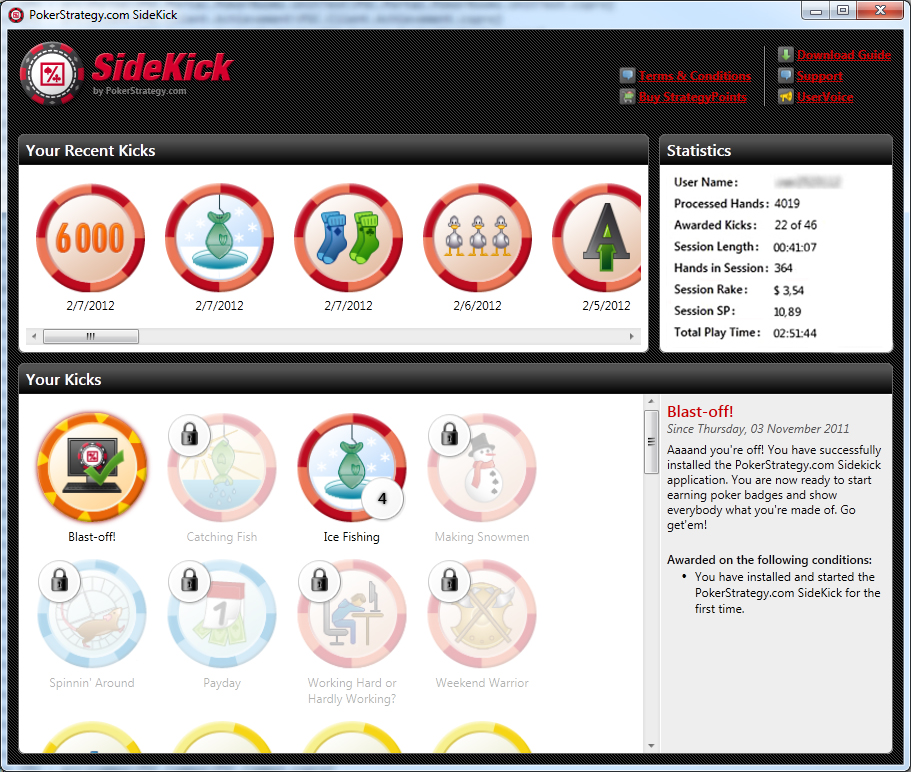 |
| The PokerStrategy.com SideKick's new window - click for larger version |
