


PokerStrategy.com SideKick: StrategyPoint Counter on Everest Poker
The PokerStrategy.com SideKick awards players with badges, or Kicks, whenever they play online poker and play a significant hand or hit a milestone. Now Everest Poker grinders can also use it to keep count of StrategyPoints!

Everest Poker players can now take advantage of one of the recent PokerStrategy.com SideKick updates, the StrategyPoints counter.
What is the StrategyPoint Counter?
The StrategyPoint Counter appears alongside your session stats, displaying your rake and StrategyPoints earned in each session of poker. This allows you to track the approximate number of StrategyPoints earned in each of your poker sessions, alongside your Kicks awarded and total hands played.
This is an excellent guide for how many StrategyPoints you will be awarded for each session, giving you a general idea of how much you will need to play to advance to the next status level.
The StrategyPoint Counter is geared towards Texas Hold'em cash games, not multi-table tournaments or other poker variants.
Use SideKick to track your progress to a higher status!
 The StrategyPoints Counter is now more useful than ever, as our Go For Status promotion is running throughout April. This means you only have to earn 10 StrategyPoints a day for 20 days to reach
  Gold status and just 90 StrategyPoints a day for 20 days to reach
  Platinum status.
This feature is currently compatible with PokerStars, PartyPoker, 888poker and now Everest Poker, with plans to incorporate iPoker as the next poker network to have this SideKick feature.
Note: the PokerStrategy.com SideKick is not the default StrategyPoints counter. To see a fully accurate overview of your StrategyPoints, you must see "My Portal" on our homepage. StrategyPoints earned in a session will not be awarded instantaneously.
StrategyPoint Counter on Everest Poker

Everest Poker grinders can now take advantage of the features of the StrategyPoint Counter.
As Everest Poker is one of the participating rooms in the Go For Status promotion, it's easy to see when you've reached 10 or 90 StrategyPoints each day to hit Gold or Platinum status.
Note: owing to technical reasons, the calculated StrategyPoints in the SideKick are not absolutely precise, as Summit Point totals are rounded to compute StrategyPoints. This means that a displayed total of 10 StrategyPoints could be 9.8 or 10.3 StrategyPoints. To see a fully accurate overview of your StrategyPoints, you must go to "My Portal" on our homepage.
For more information on the PokerStrategy.com SideKick, see our overview:
 PokerStrategy.com SideKick: Full Overview
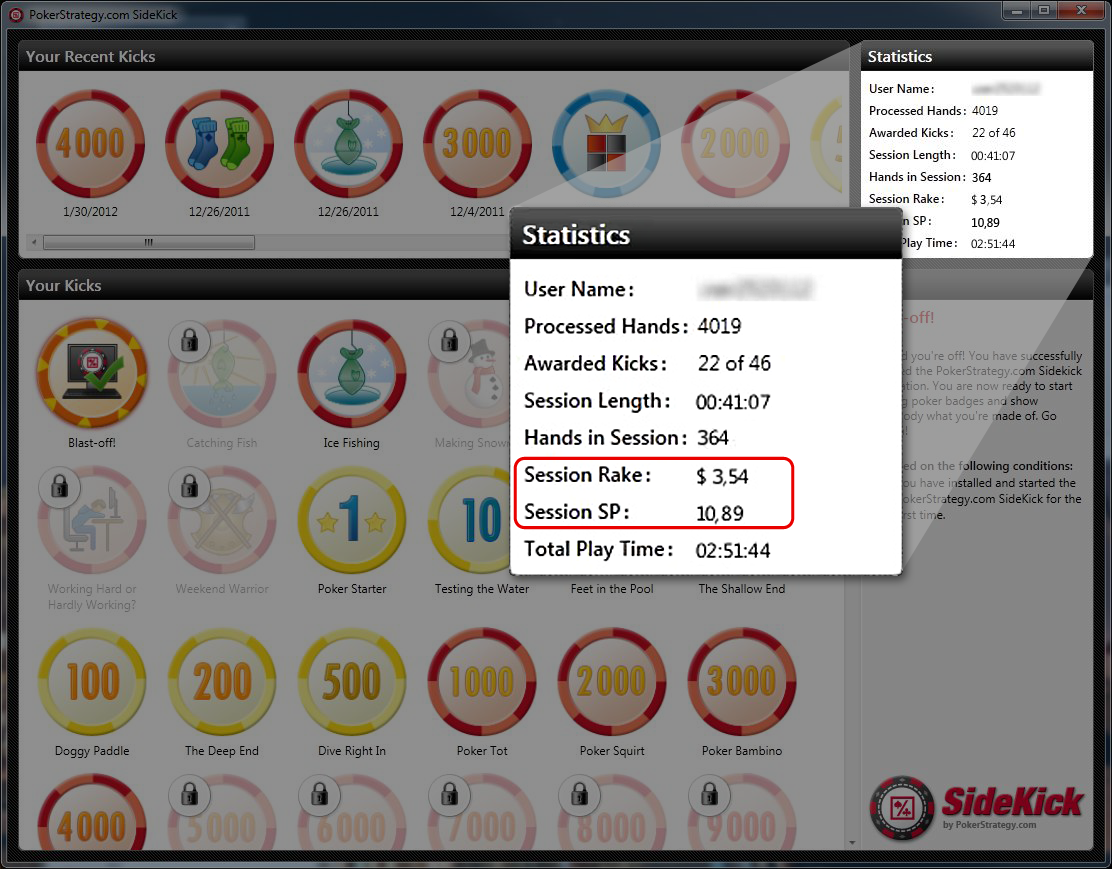 |
| PokerStrategy.com SideKick screenshot - click for bigger |
