


Guide for Working with ProPokerTools
<!--
-->
Introduction
In this article you will learn
- How to calculate the equity of specific hands
- How to calculate the equity of hand ranges
- How to calculate the playability of a hand on later streets

Understanding equity and playability of a hand in different playing situations is essential to improving one's own game. Unfortunately, there is no functional software like the Equilator available for Omaha Hi yet.
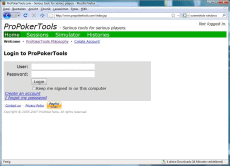
However, the website www.propokertools.com puts a strong simulator for such questions at your disposal. Aside from the possibility of calculating the equity of hands and hand ranges against each other, it also offers a feature with which the playability of hands on the later streets can be displayed.
Using ProPokerTools is free - you have the option to create an account which unlocks different features and registered users are treated preferentially, which could lead to shorter waiting times.
Simulate – Calculate the Equity
You can calculate equity with the Simulator. There you will find a selection of simulators for different game variants, which includes, among others, Texas Hold’em and Razz. Click the link Omaha Hi Simulator and you will be forwarded to the following input mask.
 |
Input mask of the ProPokerTools Omaha simulator |

The input in the simulator is text-based, so it is necessary to enter the hands manually in text format. However, the syntax is very simple and it is explained on the right side, next to the input field. Below the input field there are examples of simulations, and on the bottom right, the recent simulations of all users are displayed.
The syntax is as follows:
- A hand consists of up to 8 characters which identify the individual card values and suits.
- A, K, Q, J and T designate the cards from ace to ten.
- The remaining values are represented by their respective numbers.
- The small characters s, h, d, c designate the suits Spade, Heart, Diamond and Club.
Therefore, the designation AhQd8h7c stands for the hand A Q
Q 8 7
8 7 .
.
Let's compare AQ87 with JJTT. For hand 1, you enter AhQd8h7c, for hand 2, JcJhTcTh. Afterwards, you click on the button Simulate. Then you'll receive an output of the respective equity for both hands.
|
Equity of A |

Aside from calculating the equity of specific hands, you also have various options for entering hand ranges. The simplest one is to leave out the suit designations. The hand AA67, for instance, describes every possible combination of aces with the additional cards 67, either as a rainbow or double-suited. It is also possible to only partly limit the suits like e.g. with AAs6s7.
The strongest place holder is the * symbol, which is used as a random variable for card values – not for suits – within the hand. Thus QQ**, for instance, designates every combination which includes at least two queens, so from QQ23 rainbow, over to QQQQ and up to AAQQ. The asterisk can also be used in combination with suits. Ah*h** stands for every combination with a suited ace of hearts.
Further place holders are:
- B – for big cards (A,K,Q,J)
- M – for middle cards (T,9,8,7)
- Z – for small cards (6,5,4,3,2)
- W – for wheel cards (A,2,3,4,5)
- L – for low cards (A,2,3,4,5,6,7,8)
- N – for high cards (no-low-cards) (9,T,J,Q,K)
L and N are generally to be used for Hi/Lo games.
Thus the hand AsBhLsLh designates a hand with a suited ace and a further big suited card with two small additional cards. One of the hands from this range would be AsQh5s4h, for example.
|
Equity of the range A |

Interesting as well is measuring the equity of a specific hand against a range of some of Omaha's strongest starting hands. This can be done by entering the desired percentage value in the hand input. As an example, the following screenshot shows how the mid-rundown hand T987 is compared to the strongest 25% of all the starting hands.
|
Equity of the Top 25% vs. T987 |

You can enter the flop and turn in the field Board to calculate your equity on later streets. The following example shows you the equity (on flop and turn) of a random AA hand against a rundown hand that hit the board.
|
Equity of AA** vs. a rundown with a hit on the flop and turn |


Graph – Calculate the Playability
Besides the pure equity calculation, ProPokerTools also offers the Graph feature. This feature simulates all possible community cards on later streets and shows how they would influence your equity. Let's use the strong rundown hand JsTh9d7s as an example for the comparison with random aces.
|
Equity of AA** vs. Rundown |

The pure pre-flop equity shows the slight advantage of AA**, but on how many flops can the hands still be played well, meaning one can continue with good equity? Knowing this allows you to analyze your own decisions in reraised pots and your play as a short/mid stack.
The graph feature below the input field now shows the following two graphs:
|
Equity distribution of the hands on the flop |

The left graph shows the distribution of the equity of AA** on the flop in comparison with the JT97 hand. You see that AA has more than 60% equity in 50% of the flops, over 80% in 30% of the flops and only less than 40% in about 25% of the cases.
JsTh9d7s in the right graph only has more than 77% equity against AA** in 10% of the flops, more than 50% on 35% of the flops, and in 50% of the cases, less than 40%.
By combining this information with a decent evaluation of the opposing hands, you can gain a lot of information, e.g. when contibets are likely to pay off, and with which hands you can 3-bet/4-bet before the flop.
You can also create similar graphs with hand ranges. The following graph shows the expected distribution of equity of AA**, KK** on the turn against a small sample of possibly hands on a Q 92 flop.
|
Equity distribution of AA**, KK** on the turn |

Conclusion
Working with the website www.propokertools.com almost eliminates the need for personal equity software. Experimenting with the graph feature can certainly help improve your game in the long run. The equity calculation for reviewing your own decisions is a basic tool for developing your own intuition when making decisions during a live session.
Considering that you only have a limited amount of time at the tables, and as it isn't possible to count the clean outs in Omaha due to re-draws, freerolls and blockers, there's no better way to improve than by experimenting with such software.
| LINKS | ||||||||||
|
||||||||||


